

Suppose a team shares eight GPUs. Two are reserved for an inference service, but a training job needs all eight at once. A researcher also wants one for a notebook. When demand for inference is low, the team could assign the service’s GPUs to another job. But if requests suddenly increase, the service might not have enough GPU capacity to handle them.
The team managing the GPUs needs rules for which workloads can wait, which can be interrupted, and how soon GPU capacity must be available again. Users need persistent datasets and saved work, reproducible environments, and a way to reconnect after a workload restarts.
Backend.AI, developed by Lablup, helps teams share GPU resources and provides managed environments for developing, training, and serving AI models.
Training, inference, and interactive work
Training, online inference, and interactive development have different requirements for how long they can wait for GPUs and how they recover after an interruption.
Training and fine-tuning update model parameters and save the updated model. A distributed job may require several compatible GPUs together, with dataset access and enough network bandwidth for its workers to exchange data. If a training job needs eight GPUs but only gets four, those four may sit idle while the job waits for the other four. Interrupting the run loses progress since its last usable checkpoint, so recovery depends on saving and reloading that state. Job scheduling must account for the resources the entire job needs and whether it can tolerate interruption. 1
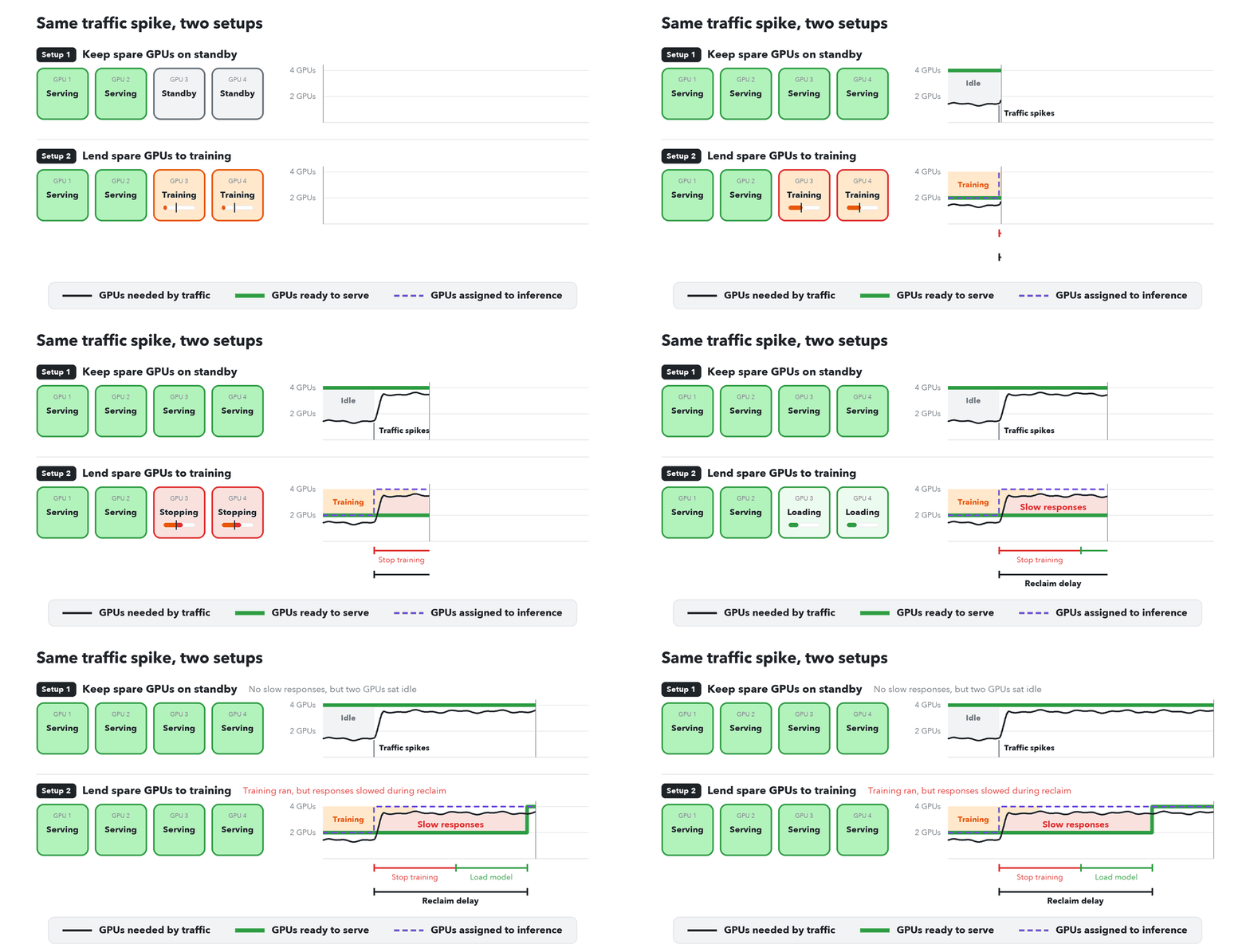
Online inference routes arriving requests to running copies of a loaded model, called replicas. A service needs enough healthy replicas to meet its latency target as traffic changes. When a model is too large for one GPU’s memory, model parallelism splits it across several GPUs, which must be allocated together for each replica. 21 Spare capacity handles bursts in traffic. If spare GPUs are running other jobs, incoming requests may have to wait for those jobs to stop and for new replicas to prepare their environments and load the model. 2, 3

Batch inference over a finite dataset can use a job queue. Roblox's 2024 engineering blog post describes adding Ray-based batch processing because its online serving setup was inefficient for offline work. 4
Shared capacity and service guarantees
Teams that lend GPUs between workloads need rules for which jobs can be interrupted and how quickly the GPUs must be returned. The cluster owner decides how much serving capacity to keep available and which training jobs can tolerate interruption.
AI21, a company that specializes in post-training models for customer tasks, explains how it allocates GPUs in an October 2026 blog post. Teams have guaranteed allocations, while a shared pool runs interruptible work on unused capacity. Jobs in the shared pool can be stopped when a team needs the GPUs covered by its guaranteed allocation. Workload labels record priority and whether a job can tolerate interruption, allowing the system to decide which work to stop. 1
Runway, an AI video-generation company, moves capacity between inference and research clusters. Keeping research in a separate cluster helps prevent runaway jobs from disrupting customer requests. The team can also test GPU driver or Kubernetes upgrades there without touching the inference cluster. Reassigning GPU machines between clusters takes 20–60 minutes, so Runway starts the process before demand is expected to rise. 2
Higher GPU utilization can leave a service unable to respond to a sudden increase in demand. Lending idle inference GPUs to training uses more of the hardware, but a traffic burst can arrive before training stops and replacement replicas finish loading. 2, 3
Backend.AI policy and operator decisions
Backend.AI provides configurable preemption, which stops an eligible running workload to free resources for a higher-priority workload. Preemption is disabled by default. Operators, the people who manage the GPU infrastructure, can enable it for a resource group and choose which users’ workloads may be interrupted, how long they must run before interruption, and whether they terminate or return to the queue.
If preemption is enabled, these defaults allow a higher-priority workload to interrupt only running workloads owned by the same user.
class PreemptionConfig:
    """Preemption configuration for a scaling group."""

    enabled: bool = False
    # ... omitted
    mode: PreemptionMode = PreemptionMode.TERMINATE
    preemption_min_runtime: timedelta = timedelta(seconds=0)
    victim_scope: PreemptionVictimScope = PreemptionVictimScope.USER
Backend.AI runs workloads in sessions. When a user deploys a model through Backend.AI’s model deployment feature, Backend.AI creates inference sessions to load the model and answer requests. It sets is_preemptible=False on those sessions so the scheduler cannot stop them to free GPUs for another workload.
deployment_draft_builder.py#L127-L135
options=SessionOptionsDraft(
    priority=SESSION_PRIORITY_DEFAULT,
    is_preemptible=False,
    cluster_mode=target_revision.cluster_config.mode,
    cluster_size=target_revision.cluster_config.size,
    # ... omitted
),
Backend.AI sets this protection when it creates an inference session. Changing the resource group's default preemption setting does not override it.
The service owner decides whether to reduce serving capacity and configures the replica count or scaling rules. Backend.AI creates and removes replicas according to those settings. Low traffic does not automatically authorize the scheduler to stop the service for training. 30
Workload owners are still responsible for saving and reloading training checkpoints. Returning an interrupted training session to the queue does not restore its training progress.
One possible shared GPU deployment
The diagram below combines patterns from several engineering posts to show how a shared GPU cluster could be organized. 5, 6, 7, 8 It is not a service layout of Backend.AI.
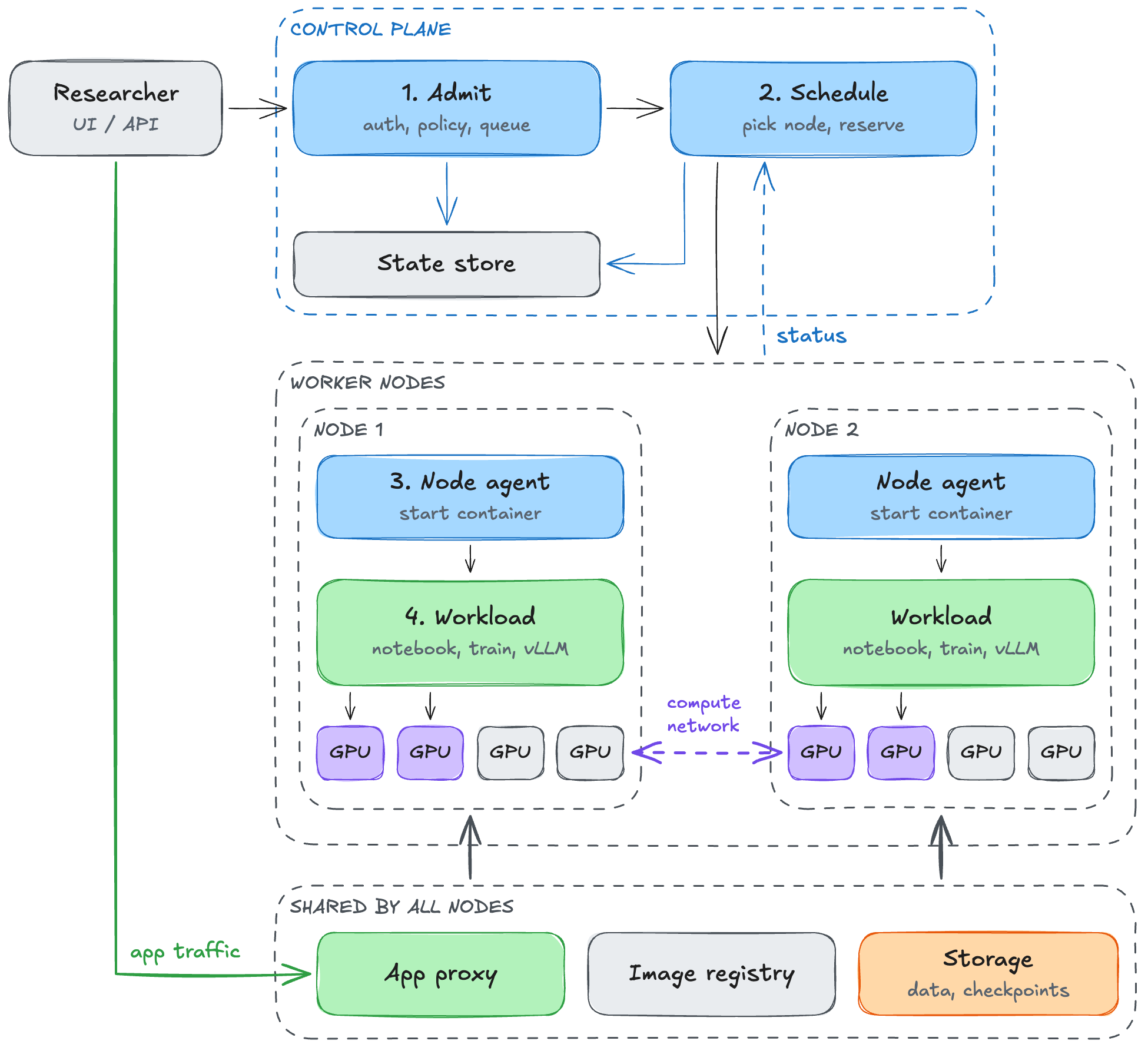
The user submits an image, a command, resource requirements, and data locations. The control plane checks identity and policy, records the request, and selects compatible capacity from a cluster, a group of machines managed together. On each selected machine, or node, an agent prepares the image, mounts storage, configures device access, and starts the workload.
Training workers read datasets, exchange data over the compute network, and save checkpoints. A model service loads its weights and passes health checks before receiving traffic. A notebook needs an authenticated route from the browser to its running process. Application traffic and storage access follow their own paths without passing through the placement scheduler. 3, 6, 7
Status events and periodic checks let management services compare intended state with observed state. If a workload fails to start, the platform must release the resources it reserved so other workloads can use them. A service that loses a replica needs a replacement, while interrupted training requires the application to recover from a checkpoint. Lablup redesigned Sokovan, Backend.AI’s workload scheduler and lifecycle manager, after network or agent failures left sessions stuck waiting to run. The redesign separated request handling from periodic checks that move sessions through startup, execution, and cleanup. 8
Backend.AI, Kubernetes, and Slurm
Backend.AI, Kubernetes, and Slurm allocate shared compute resources and manage workloads across machines. For GPU workloads, the choice affects how users submit work and how much software the operator must assemble around the scheduler.
Backend.AI provides an integrated platform for AI workloads. It includes container environments, notebook access, managed folders, and model deployment. 28, 30 With Slurm, administrators must configure software environments, shared storage, and tools for notebook access and model deployment themselves. 33
Kubernetes manages containerized applications. Users describe the containers and resources an application needs, and Kubernetes places them on machines and manages their execution. It supports services and batch jobs. Teams add tools for notebook access, model deployment, and shared GPU queueing, choosing and integrating those components themselves. 31
Slurm organizes work as jobs competing for cluster resources. Users request resources such as GPUs, CPUs, and memory, and Slurm queues jobs until suitable capacity is available. This suits training and other compute jobs. Interactive work is also possible, with tools such as Open OnDemand adding browser access to notebooks and cluster applications. 32, 15
Slurm and Kubernetes can also be combined, as SchedMD’s 2023 comparison outlines. 35 NVIDIA’s April 2026 post describes one such setup using Slinky. Kubernetes runs and manages the Slurm components as containers, while Slurm schedules the training jobs. 34
The diagram below compares the software that provides user access, resource policy, scheduling, and node execution in Backend.AI, Kubernetes with add-ons, and Slurm setups.
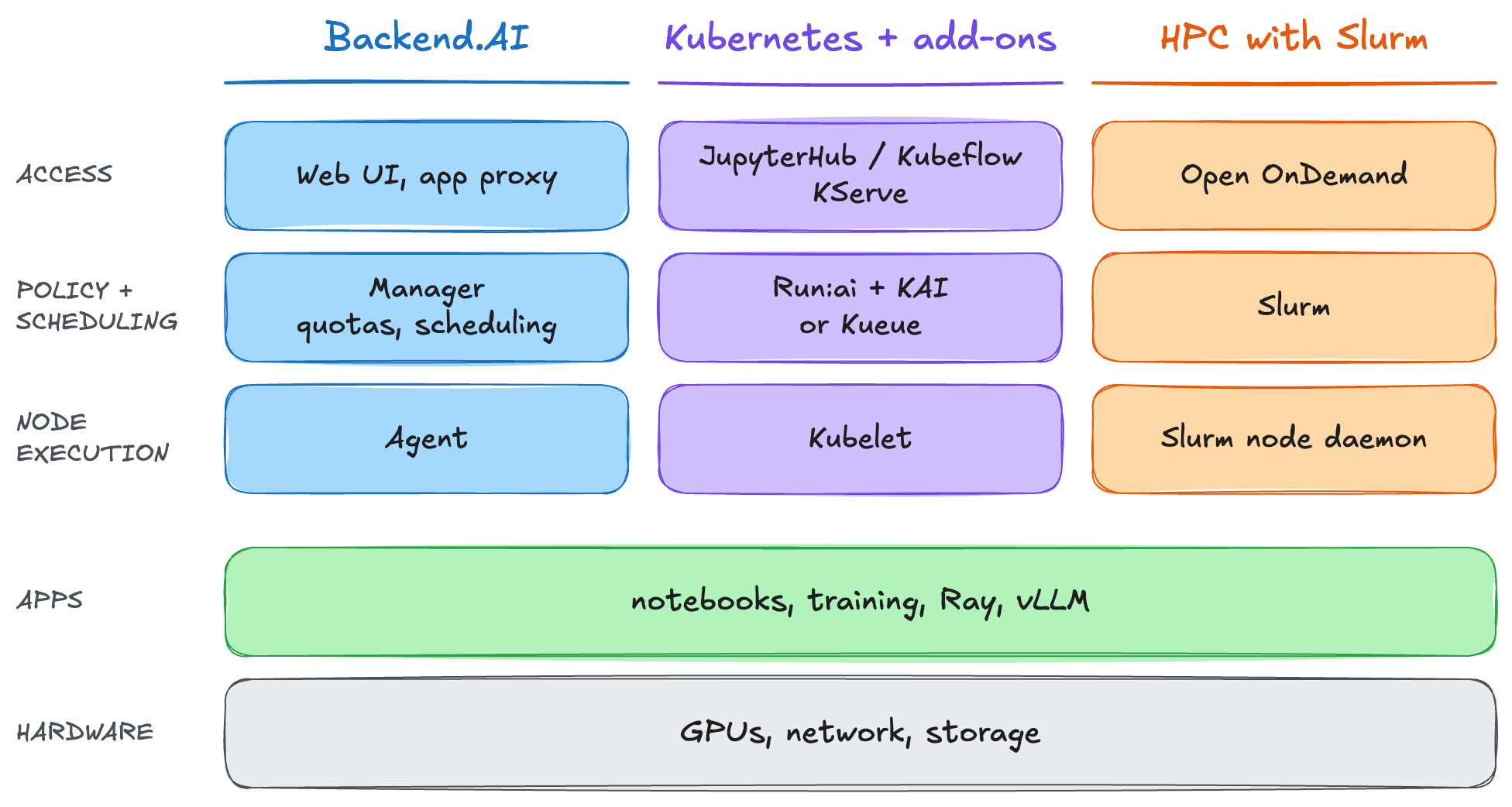
The applications and hardware rows extend across all three columns. The management components allocate resources for notebooks, training jobs, Ray, a framework for distributed computing, and vLLM, an inference engine for large language models. These applications use the underlying GPUs, network, and storage. Ray schedules application tasks and actors within its cluster. vLLM loads models and processes inference requests. A model service can therefore use Backend.AI to manage the workload and vLLM to execute the model. 17, 7
Backend.AI architecture
Backend.AI uses several services to run notebooks, training jobs, and model deployments. The process begins when a user submits a workload request. The request includes the software environment, required resources, and persistent folders to mount. A session can contain one or more execution containers, called kernels in the code.
The diagram below shows how Backend.AI manages sessions, lets users upload and download files, and routes requests to running notebooks and model endpoints. 24, 25
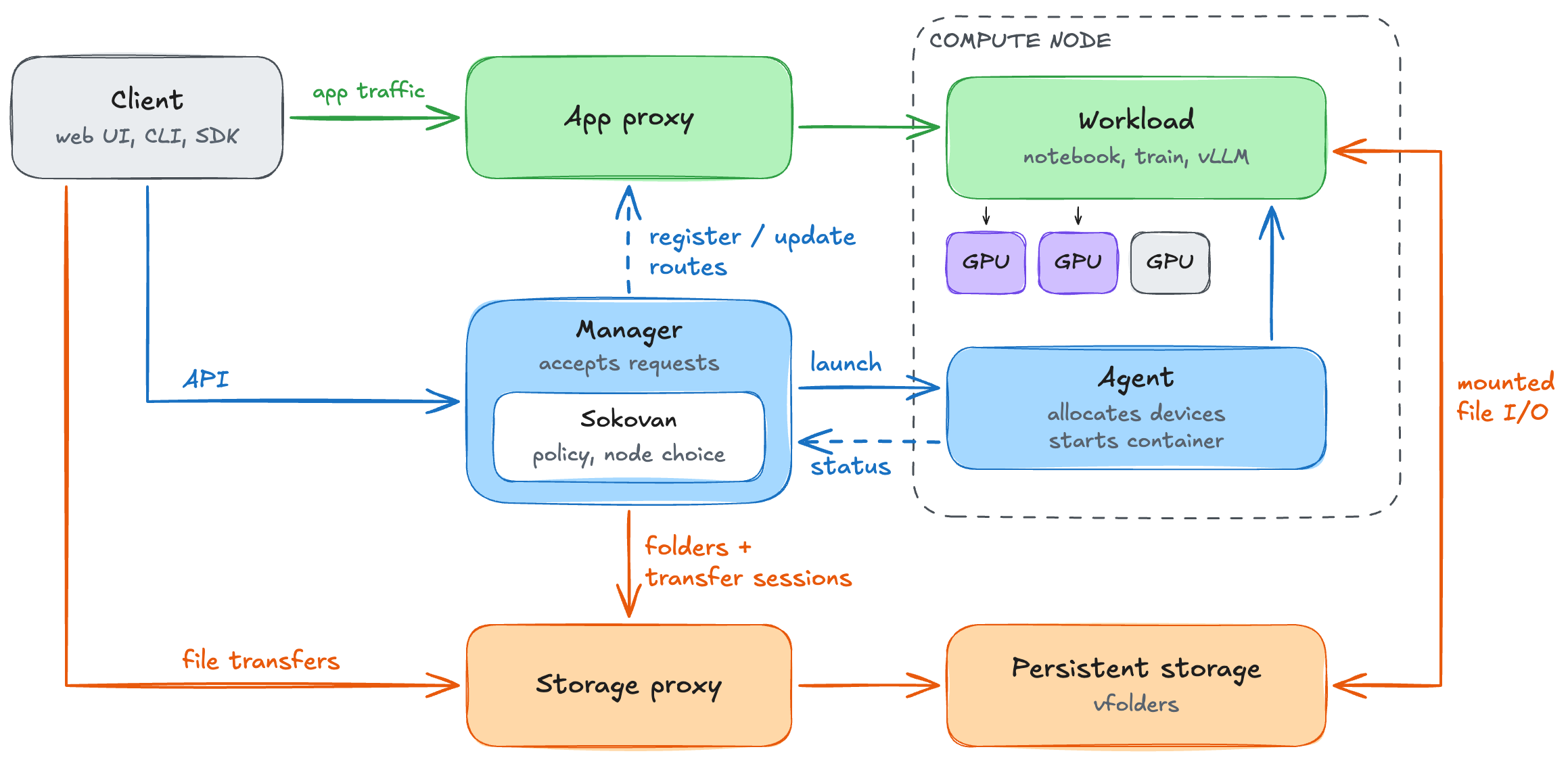
The manager accepts requests and records session state in PostgreSQL. Its Sokovan orchestrator checks resource policy and selects compute nodes. Events and periodic checks let Sokovan revisit pending lifecycle work. 8, 24, 26
On the selected compute node, the agent allocates devices and configures the container runtime to start the workload. It reports resource availability and workload status to the manager. 24
The manager registers and updates routes in the application proxy, which forwards notebook and model-service traffic to running workloads. 26
The storage proxy manages folders and file transfers. Before an upload, the manager checks access and requests a transfer session. It then returns a token and storage-proxy URL to the client. The client sends file bytes directly to that URL, while workloads access persistent files through their mounted storage. 25, 27
Let’s now walk through an imaginary scenario. Bob has finished testing a model in a notebook and wants to make it available through a vLLM endpoint. His deployment needs one replica on one whole GPU. He shares a resource group of four GPUs with Alice’s training work and other users’ notebooks. The subsequent illustrative walkthrough sequence follows the deployment through scheduling and startup to a successful inference response.
Reusing model files across sessions
Bob saves the model files before ending his notebook session. His serving request will create a different container, which needs a software environment and access to the files produced during development.
In Backend.AI, the container image supplies a session's software environment. Managed persistent folders, called vfolders, hold datasets, code, and saved results outside the container. A session mounts a vfolder as a directory that programs can read or write, subject to its permissions. The folder remains available after the session ends. 28

The request specifies an image with vLLM installed and a vfolder containing the saved model. Before the session enters the scheduling queue, the manager prepares the container configuration through small steps called rules. Folder access and storage paths are resolved first. The vfolder-mount rule then copies the resolved mounts into each container’s specification, selecting the folder list for that container’s role.
Note that numbered comments in code snippets such as # (1) are explanations added for this blog post.
resolve_vfolder_mounts_rule.py#L48-L61
# (1) Folder access and paths are already resolved, grouped by role.
resolved = context.user.vfolder_mounts_by_role
if not resolved or not draft.resource.kernel_specs:
    return draft
updated = []
# (2) Each kernel is one execution container.
for kernel in draft.resource.kernel_specs:
    role = kernel.cluster_role
    mounts = resolved.get(role, ()) if role is not None else ()
    if mounts == kernel.vfolder_mounts:
        updated.append(kernel)
        continue
    # (3) Save mount settings for the node agent to use during container startup.
    updated.append(kernel.model_copy(update={"vfolder_mounts": mounts}))
return draft.model_copy(
    update={"resource": draft.resource.model_copy(update={"kernel_specs": tuple(updated)})}
)
The recorded mounts let the node agent attach the vfolder to the serving container or a later replacement. Protection against disk or storage-server failure still depends on the underlying storage system, including replication and backups.
Backend.AI has now recorded the container image to use, the model’s storage location, and the request for one GPU. Preparing that configuration has not reserved a device. The request must next pass the resource-policy checks and obtain compatible capacity.
Resource limits and the waiting queue
At submission, Bob’s project has a quota of two GPUs and has already allocated one to another session. Adding his one-GPU request would bring the project to its limit. The request fits the quota, but existing sessions occupy all four GPUs in the resource group, so his model cannot start.
A GPU quota limits how many GPUs a user or project may have allocated at once. Available capacity is the GPU capacity currently free on compatible machines. A session needs enough capacity, and its allocation must keep the user and project within their quotas.
The right-hand case below matches Bob’s situation. In the left-hand case, the project already holds two GPUs, so another allocation would exceed its quota even though a device is free.

The validator adds the requested resources to the project’s existing allocation and compares the result with its limit. For Bob’s project, one allocated GPU plus one requested GPU fits the quota of two, so the project check does not report a quota error.
project_limit = policy.by_project.get(workload.meta.owner.project_id)
if project_limit is not None:
    # (1) Count resources already allocated to the project.
    project_allocation = occupancy.by_project.get(
        workload.meta.owner.project_id, ResourceAllocation.empty()
    )
    # (2) Check existing allocation + new request against the quota.
    project_excesses = project_allocation.exceeded_slots(request, project_limit)
    if project_excesses:
        errors.append(ProjectResourceQuotaExceeded(excesses=project_excesses))
The validator also checks user and domain limits. A domain is an organizational scope containing projects and users. Validation can report violations across these scopes, but passing quota checks does not establish that a compatible machine has capacity. Permission to use a resource and its availability are separate conditions. Raising a project’s quota cannot free a busy GPU. Adding a GPU cannot make an over-quota request valid. Reporting which condition blocks a session explains why it is pending.
In Runway’s setup, work could pass Kueue’s quota check while its Kubernetes Pods remained pending because the physical nodes were unavailable. The quota validator shown here also does not establish guaranteed capacity, borrowing, or a reclamation deadline. 5
Queue order under resource pressure
Each session has a numeric priority. The scheduler checks higher-priority sessions first. With FIFO, sessions at the same priority are checked in submission order.
Two GPUs become free. Alice and Bob have the same priority, and FIFO puts Alice first because she submitted her request earlier. Bob needs one GPU, while Alice needs all four together. Her request fits her project’s quota, but only two GPUs are available. Let’s say preemption is disabled.
Starting Bob’s workload now would use a GPU that Alice’s workload needs. If smaller jobs keep taking GPUs as they become free, Alice's job may end up waiting indefinitely. When Alice’s request fails the capacity check, Backend.AI stops checking queued requests until the scheduler runs again. Bob’s request is not checked, so he stays in the queue and the two free GPUs remain idle.
The diagram also shows what happens when Alice is blocked by her project’s quota. In that example, she requests one GPU, but her project already uses its limit of two. Alice’s project has reached its quota, but other projects can still use the free GPUs. The scheduler therefore checks whether Bob’s request fits his project’s quota and the available GPU capacity.
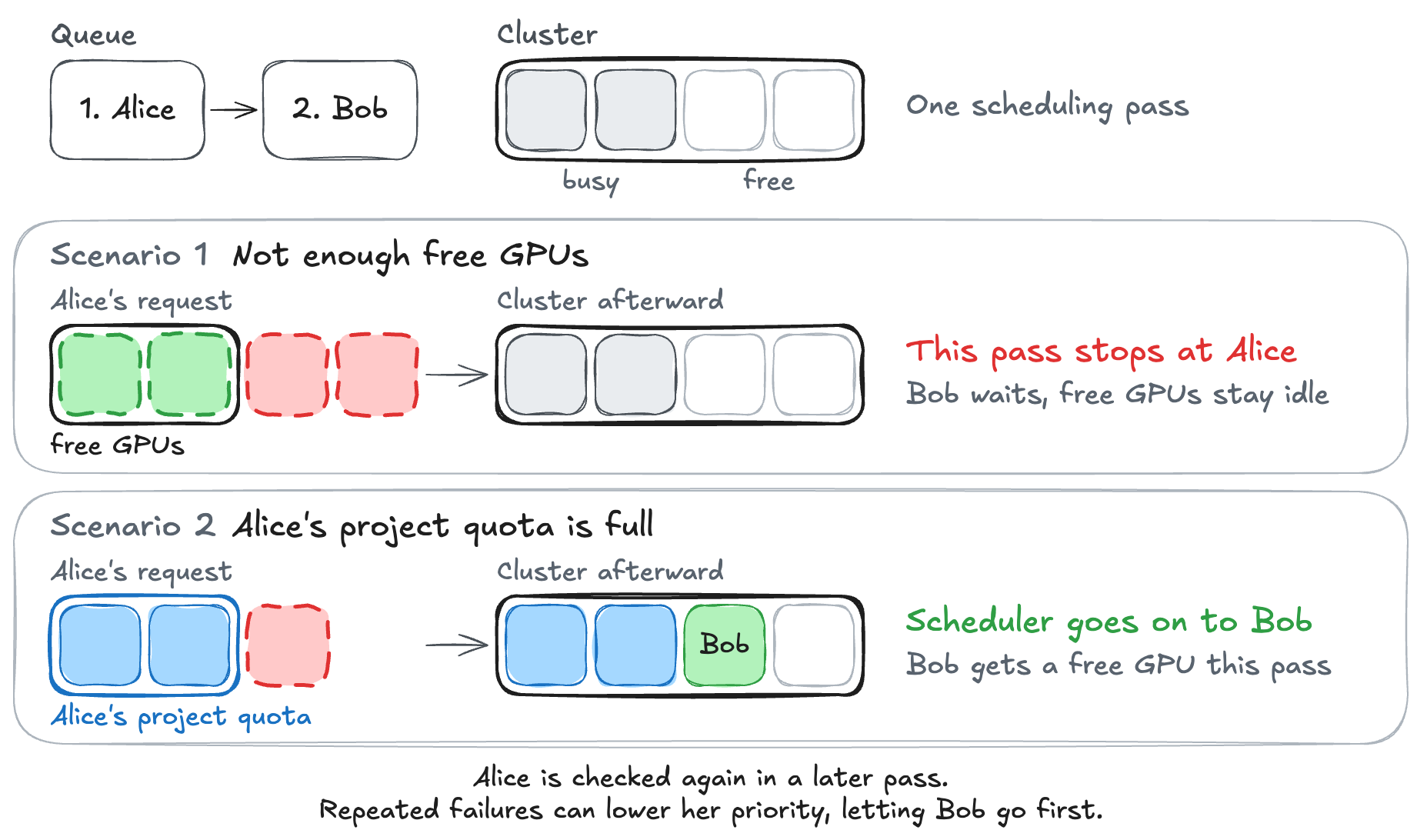
The first exception branch records Alice’s capacity failure and reaches break. Bob’s request is skipped without a placement attempt. A session-specific error, including a quota violation, takes the second branch and allows the loop to continue.
for index, session_workload in enumerate(sequenced_workloads):
    try:
        # Sequencing phase is automatically included via shared phases
        session_allocation = await self._schedule_workload(
            state,
            session_workload,
            claimed_victim_ids,
        )
        # ... omitted
    except (BatchAgentSelectionFailedError, NoAvailableAgentError) as e:
        # The group ran out of resources. This is the one failure the
        # sessions behind share: they would take exactly what this one
        # is waiting for, so they are left unattempted.
        self._record_failure(scheduling_failures, session_workload, e)
        scheduling_skips.extend(
            self._skips_behind(
                sequenced_workloads[index + 1 :], session_workload.meta.session_id
            )
        )
        # (1) Stop this pass even if a later, smaller request could fit.
        break
    except Exception as e:
        # Specific to the session that hit it (an architecture mismatch,
        # an unsatisfied dependency, an exceeded quota, a group with no
        # agents at all), so it must not stall the sessions behind it.
        # (2) Record this session's error and let the loop try the next request.
        self._record_failure(scheduling_failures, session_workload, e)
The pull request for this queue-order change explains that lower-priority sessions had been repeatedly consuming resources needed by blocked higher-priority work. 18
Repeated scheduling failures can move Alice behind Bob. Backend.AI uses a default retry limit of five recorded attempts. When Alice reaches that limit and scheduling fails again, Backend.AI lowers her session’s priority by ten, without going below zero, and returns it to the pending queue at that priority. Bob’s skipped requests do not count as failed attempts, so they do not lower his priority.
deprioritize_sessions.py#L120-L123
session_ids = [s.session_info.identity.id for s in sessions]
await self._repository.lower_session_priority(
    session_ids, DEPRIORITIZE_AMOUNT, SESSION_PRIORITY_MIN
)
FIFO orders requests within each priority level, after higher-priority requests. If Alice's priority falls below Bob's, the next pass can try Bob first and allocate him a free GPU while Alice still waits.
Preserving queue order can leave usable capacity idle. Backend.AI stops checking the remaining queued requests, even if a smaller request could use the free GPUs. It does not estimate whether that request could finish before the blocked request can start. Slurm’s backfill scheduler uses job time limits to make that calculation, allowing lower-priority jobs to run when they will not delay higher-priority jobs’ expected starts. 16
For the rest of this example, suppose all four GPUs become free while Alice is still first in the queue. Backend.AI allocates them to Alice, but the allocation does not guarantee that her container will start. If startup fails, Backend.AI must release those reservations before Bob can use the GPUs.
Releasing GPUs after a container fails to start
Suppose Alice’s container fails to start after Backend.AI reserves the four GPUs for her job. The GPUs are idle, but the platform still records them as allocated to Alice. Backend.AI must clear the failed job’s reservations before the scheduler can assign a GPU to Bob.
In this example, Alice’s ordinary job is not retried ahead of Bob after startup fails. Bob is the next eligible request.
The diagram below shows the agent’s and manager’s allocation records for the same GPU. The agent releases its local reservation first. Bob must wait until the manager also clears its record and the scheduler runs again.
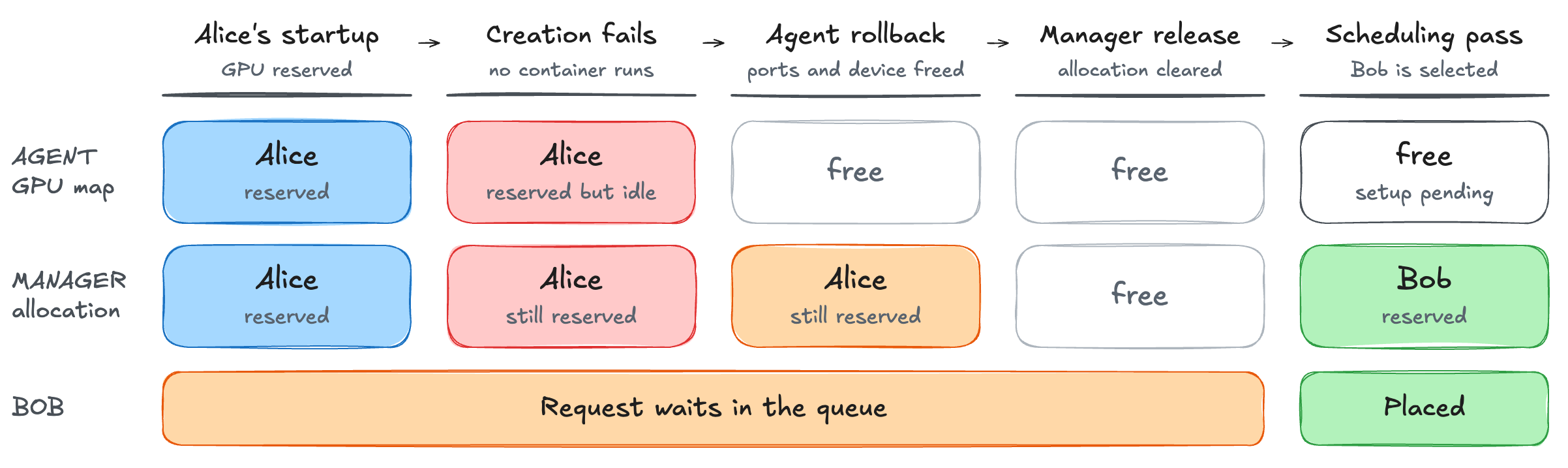
If container creation fails, the Docker agent calls a cleanup function on the machine where the container was supposed to run. This function releases the network ports and device resources reserved for that container.
# (1) In the rollback helper, release the reserved host ports.
self.port_pool.release_many(host_ports)
async with self.resource_lock:
    for dev_name, device_alloc in resource_spec.allocations.items():
        # (2) Return device capacity so other workloads can use it.
        self.computers[dev_name].alloc_map.free(device_alloc)

# ... omitted
except Exception as e:
    # Oops, we have to restore the allocated resources!
    # (3) Later, a container-creation error calls the rollback helper.
    await _rollback_container_creation()
The rollback frees the device in alloc_map, the agent’s local allocation record. The scheduler places sessions using the manager’s separate allocation record. After failed creation, the agent reports the kernel as terminated, and the manager frees the kernel’s allocation. Freeing the agent’s device allocation is not sufficient for Bob to be scheduled. The manager must release its record as well.
The scheduler must then check the waiting requests again. Backend.AI uses events to respond promptly and periodic processing to revisit pending lifecycle work. The coordinator also schedules periodic checks that run even without an event signal.
# Create long-cycle task spec (always present)
long_spec = EventTaskSpec(
    name=spec.long_task_name,
    # (1) Request processing even without an event hint.
    event_factory=spec.create_process_event,
    interval=spec.long_interval,
    initial_delay=spec.initial_delay,
)
specs.append(long_spec)
Alice’s failed launch illustrates recovery from a container-creation exception, where the Docker agent can run cleanup and report the failure to the manager. This example does not cover cancellation or recovery after a process or node crash.
Once the manager records enough free capacity and the scheduler processes the queue again, Bob’s request can proceed. The agent must then prepare a container with access to the saved model and a physical GPU.
Choosing a machine and starting the container
The scheduler can now reserve one GPU for Bob’s session on a compatible machine. Before Bob’s container can use the GPU, that machine’s agent must select a physical device and configure the container to access it.
Placement on unequal machines
When several machines can run a request, the scheduler must choose one. It can compare how many CPUs are free on each machine, or what percentage of each machine’s CPUs are free. These comparisons can lead to different choices.
Suppose a request needs one CPU and can run on either of two machines. The small machine has four CPUs, all free. The large machine has 64 CPUs, with 32 allocated and 32 free. Comparing free CPU counts favors the large machine, while comparing the percentage of CPUs free favors the small machine.
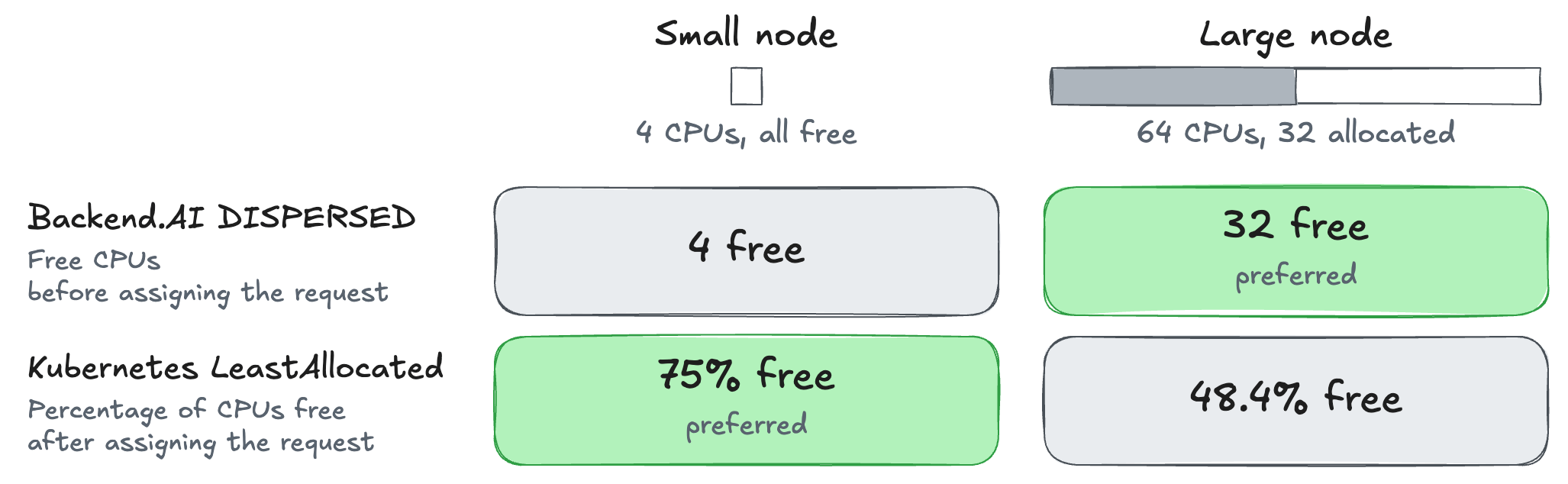
For the machines shown in the diagram, Backend.AI’s DISPERSED selector compares the number of free CPUs. It chooses the large machine because 32 CPUs are free there, compared to 4 on the small machine.
def tracker_sort_key(tracker: AgentStateTracker) -> list[int | Decimal]:
    remaining_slots = tracker.remaining_slots()
    return [
        # First, prefer agents with fewer unutilized capabilities
        -count_unutilized_capabilities(
            tracker.original_agent, resource_req.requested_slots
        ),
        # Then, prefer agents with more remaining resources (using current state)
        *[remaining_slots.get(key, -sys.maxsize) for key in resource_priorities],
    ]
# (1) Compare list elements left to right. Free amounts break capability ties.
return max(trackers, key=tracker_sort_key)
With only CPU contributing to the score, Kubernetes LeastAllocated prefers the small machine. After accounting for the incoming request, the small machine would have 3/4 of its CPUs free, compared with 31/64 on the large machine.
For Bob’s GPU request, the manager chooses a machine with enough free capacity. A machine can contain several GPUs, so its node agent must then select a device (physical GPU) for Bob’s container.
Allocation and device access
After selecting a GPU for Bob, the agent must tell Docker which GPU the container should be able to use. It asks the accelerator plugin to generate the required Docker settings and uses them when creating Bob’s container.

async def apply_accelerator_allocation(
    self,
    computer: AbstractComputePlugin,
    device_alloc: Mapping[SlotName, Mapping[DeviceId, Decimal]],
) -> None:
    async with closing_async(Docker()) as docker:
        update_nested_dict(
            self.computer_docker_args,
            # (1) Ask the accelerator plugin for Docker settings for these devices.
            await computer.generate_docker_args(docker, device_alloc),
        )
The public CUDA plugin constructs an allocation map with one countable slot for each discovered device. Bob’s request for one GPU corresponds to a whole device in that map.
async def create_alloc_map(self) -> AbstractAllocMap:
    devices = await self.list_devices()
    return DiscretePropertyAllocMap(
        device_slots={
            # (1) Each physical GPU has one countable whole-device slot.
            dev.device_id: DeviceSlotInfo(SlotTypes.COUNT, SlotName("cuda.device"), Decimal(1))
            for dev in devices
        },
    )
Sharing a GPU and enforcing limits
Suppose two workloads each need 12 GiB of GPU memory. They could share a GPU with 24 GiB of usable memory instead of each occupying a separate GPU. If the platform defines 0.5 GPU as half the GPU’s memory, the scheduler can accept a 0.5 GPU request from each workload and assign them to the same GPU.
The scheduler has decided where the workloads will run, but that decision alone does not stop either workload from using more than 12 GiB. One could use 16 GiB, leaving only 8 GiB for the other. To keep each workload within its 12 GiB share, the software or hardware that controls GPU memory must reject requests that would take its total usage above 12 GiB. 20
Backend.AI’s agent guide lists fractional GPU sharing as an Enterprise feature. 19 NVIDIA’s Kubernetes integration provides a documented example of how memory limits can be enforced. 20

In NVIDIA’s CUDA 13.4 example, KAI Scheduler selects a GPU and records the workload’s memory reservation and maximum. GPU Fractioning Operator reads those settings on the GPU machines and configures CUDA before the workload starts. With this integration enabled, the memory limit defaults to the requested amount unless a separate limit is specified.
As the application runs, it requests GPU memory to store its data. With a fixed 12 GiB limit, CUDA rejects any request that would increase the application’s total GPU memory use above 12 GiB. Unused memory from another workload does not raise this fixed limit. 20
Memory limits do not determine how workloads share compute or whether a failure in one workload affects another. In CUDA 13.4’s time-slicing mode, workloads take turns on the GPU, with errors isolated between workloads. In SM-sharing mode, workloads run concurrently on the GPU’s processing units and share an error domain, so a GPU fault can affect other workloads on the GPU. 20
A fractional allocation needs separate guarantees for memory, compute, and fault isolation. Users need to know how much GPU memory they can use, how concurrent workloads affect performance, and whether another workload’s GPU fault can interrupt their work.
Bob’s request remains a whole-device allocation through the public plugin. The agent prepares the image, applies the vfolder mounts recorded before scheduling, and configures GPU access. It can now start vLLM with the model files Bob saved during notebook work.
Loading the model and preparing to serve requests
The node agent on the machine chosen for Bob starts his container, and vLLM begins loading the saved model. The replica counts toward his deployment’s target of one but cannot yet answer requests. Backend.AI counts a replica toward the deployment’s target while it is being prepared, even before its container starts. The code calls this the “live” count, but it does not mean the replica can already serve requests.
Backend.AI checks replica count separately from serving health to avoid repeatedly triggering scaling while a model loads. A deployment can therefore reach its target replica count before those replicas are ready to serve requests.
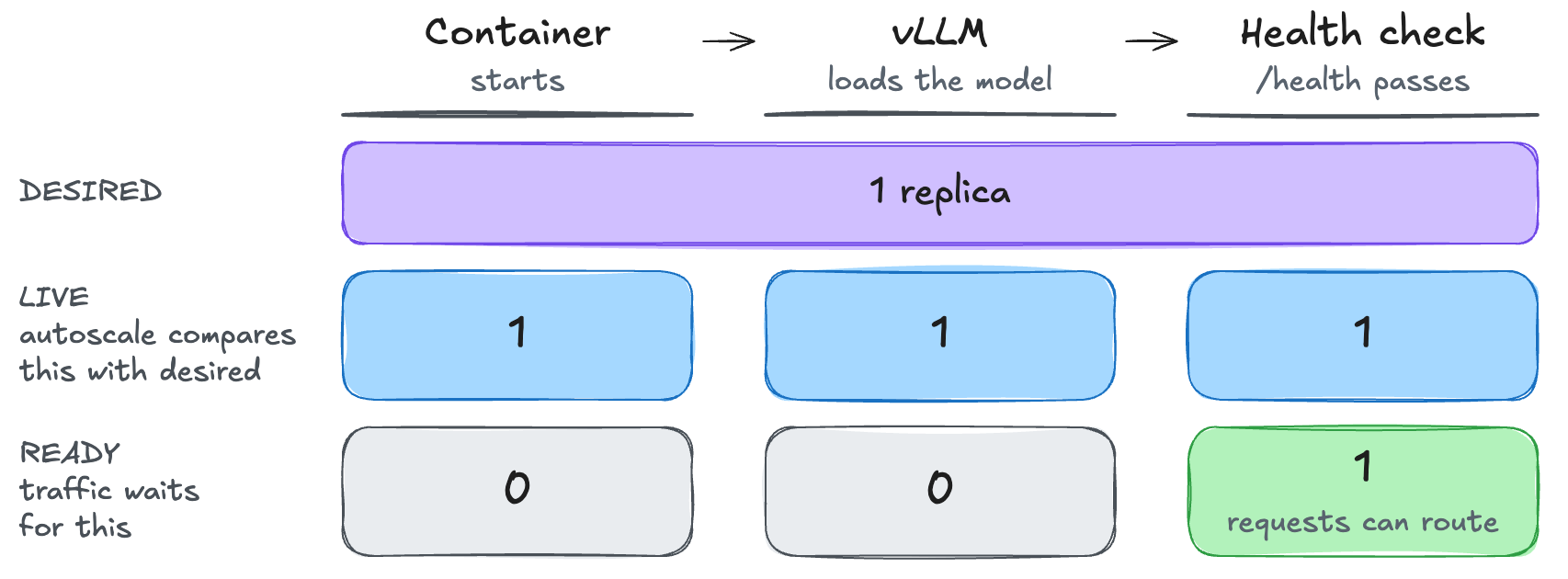
The diagram begins when Bob’s container starts. Bob keeps the vLLM runtime’s default health check at /health on port 8000.
The deployment handler compares the desired replica count with the number of live replicas. Counting replicas before they are ready prevents repeated scaling attempts during model loading.
goal = view.deployment_desired_replica_count
# Count-only, mirroring the steady-state scaling reconcile. Serving health
# is judged separately and must not re-arm scaling; otherwise a group that
# cannot fully serve (resource starvation) would oscillate STABLE<->SCALING.
converged = (
    # (1) With a current revision, compare the live count with the desired count.
    view.current_revision_id is None or view.current_live_replica_count == goal
)
# FAILURE re-arms scaling so the scaling reconcile fills/drains routes.
# (2) A target mismatch also requests another scaling pass.
if view.desired_current_replica_count != goal:
    outcome = HandlerOutcome.FAILURE
    message = "scaling current revision toward desired count"
elif not converged:
    outcome = HandlerOutcome.FAILURE
    message = "live replicas drifted from desired; re-arming scaling"
else:
    outcome = HandlerOutcome.SUCCESS
    message = "current revision at desired count"
After Bob’s container starts, vLLM must load the model before it can answer requests. Bob’s deployment has reached the requested count of one, so the count check alone does not call for another replica. The service must still pass its separate health check before handling requests.
Backend.AI does not start another replica just because vLLM is still loading the model. An enabled startup health check can still time out, terminate the replica, and lead to a replacement.
Backend.AI tracks each replica through a route record, which stores the replica’s session and health status. Here, initial_delay is the time limit for passing the health check, not a delay before the first probe. A passing probe can activate the route earlier. An unready route fails once the elapsed time exceeds the configured limit. The default limit for Backend.AI’s vLLM runtime is 1,800 seconds, subject to overrides.
health_check = route.enabled_health_check
if health_check is None:
    successes.append(route)
    continue

status = statuses.get(route.route_id)
if status is not None and status.healthy:
    successes.append(route)
    continue

if route.last_transition_at is None:
    continue

elapsed = (now - route.last_transition_at).total_seconds()
if elapsed > health_check.initial_delay:
    errors.append(
        RouteExecutionError(
            route_info=route,
            reason="Route warming-up timed out waiting for healthy probe",
            error_detail=(
                f"Elapsed {elapsed:.0f}s exceeds "
                f"initial_delay {health_check.initial_delay}s"
            ),
        )
    )
If the startup health check times out, Backend.AI marks the replica for shutdown and stops counting it toward the deployment’s target. The deployment can then create a replacement. Bob’s replica becomes ready before the deadline, so it does not need to be replaced.
Storage performance during serving
The vfolder made Bob’s model files available to the new session. Reading those files and loading the weights still take time after the GPU has been allocated.
Startup can take longer when many replicas download the same model weights at once, as Baseten describes in its April 2026 engineering blog post. Its delivery system mirrors and caches those weights to reduce startup delays. 3
Storage speed also affects how much work the GPUs can do. Meta’s July 2026 engineering blog post describes bursts of dataset and checkpoint access when many GPUs start or restart together. 6
In a June 2026 inference benchmark, Lablup and VAST Data, a data infrastructure company, ran an application inside a Backend.AI session with VAST storage mounted. The application used LMCache to move its KV cache, attention data saved from previously processed tokens, between GPU memory and storage. Reloading this cache lets the model reuse earlier calculations when requests share the same input text. Backend.AI managed the session and storage access, while NVIDIA GPUDirect Storage transferred the cache data directly between storage and GPU memory. The benchmark measures cache reuse during inference, so it does not tell us how long Bob’s model weights would take to load.
Once vLLM has loaded Bob’s saved model and the health check passes, his endpoint is ready to answer requests.
Queueing, placement, and reclamation in practice
We ran Backend.AI locally to test how queue order, placement, and idle reclamation affect waiting jobs. The FIFO and idle-reclamation tests used running Backend.AI services and CPU containers. For placement fragmentation, we ran Backend.AI’s scheduling code against synthetic GPU inventories to test whether a request could fit when free capacity was split across machines. The companion repository contains reproduction instructions and recorded results for each experiment.
FIFO queue order and resource release
The experiment repository contains the runnable demo, saved recording, and instructions for reproducing it locally.
The experiment tests whether FIFO queue order leaves usable capacity idle, and whether ending a session lets waiting work start. CPU slots let us test the allocation and release paths on a laptop without a GPU or a model to load.
We ran Backend.AI 26.9.7 with Python 3.13.18 on macOS ARM64. The reproduction scripts support macOS ARM64 with Docker Desktop. The manager, agent, and storage proxy ran as local processes. Docker ran PostgreSQL, Valkey, and etcd, along with the session containers created by Backend.AI. Valkey and etcd provide shared state and coordination for Backend.AI components, whether the components run on one machine or across several. Valkey holds real-time state and carries system events between services. etcd stores shared configuration and supports service discovery.
The setup exposed one agent with four schedulable CPU slots in the default FIFO resource group. We created one administrator account with sufficient quota and submitted all requests through it at the same priority. Current, Alice, and Bob are session labels. Using one account lets the experiment test queue order and available capacity without differences between users’ quotas.
Current occupies two of the four slots. Alice asks for all four, then Bob asks for one. Alice must wait for Current to finish, while Bob’s smaller request could fit in the remaining capacity.
REQUESTS = {"current": 2, "alice": 4, "bob": 1}

# ... inside the session creation method
session = await self.bounded(
    api.ComputeSession.get_or_create(
        self.config.image,
        name=name,
        type_="interactive",
        priority=10,
        enqueue_only=True,
        no_reuse=True,
        resources={"cpu": REQUESTS[label], "mem": self.config.memory},
        architecture=self.config.architecture,
        domain_name=self.config.domain,
        group_name=self.config.project,
        scaling_group=self.config.resource_group,
        mounts=[],
    )
)
enqueue_only=True returns after the request is queued. The recorder waits for Current to reach RUNNING before submitting Alice and Bob. It then polls the running services for session states, resource allocations, and scheduling history.
With Current running, the agent reported two CPU slots allocated out of four, while Alice and Bob remained pending. Scheduling history showed that Alice passed policy validation but could not fit because she needed two more CPU slots. In the same FIFO scheduling pass, Bob’s SKIPPED result named Alice as the earlier session that prevented his request from being attempted. FIFO kept Bob pending behind Alice even though Bob’s one-slot request fit the remaining capacity.
To observe resource release, the runner terminated Current through the API and waited for Alice to start. The recorder’s automated conditions identify this transition in live API responses and stop the run if a session enters ERROR.
await recorder.terminate("current", "end_current")
sample = await recorder.wait(
    api,
    "alice_running",
    lambda row: (
        _running_with_cpu(row, "alice", 4)
        and _session(row, "current")["status"] == "TERMINATED"
        and _cpu(_session(row, "current")["occupied_slots"]) == 0
        and _session(row, "bob")["status"] == "PENDING"
        and _cpu(row["agent"]["occupied_slots"]) == 4
    ),
)
The recording shows Current reaching TERMINATED, followed by Alice reaching RUNNING. After the runner terminated Alice, Bob reached RUNNING with one slot. Final cleanup terminated Bob and returned the agent’s reported usage to zero. The runner requested these terminations. The scheduler did not preempt the sessions.
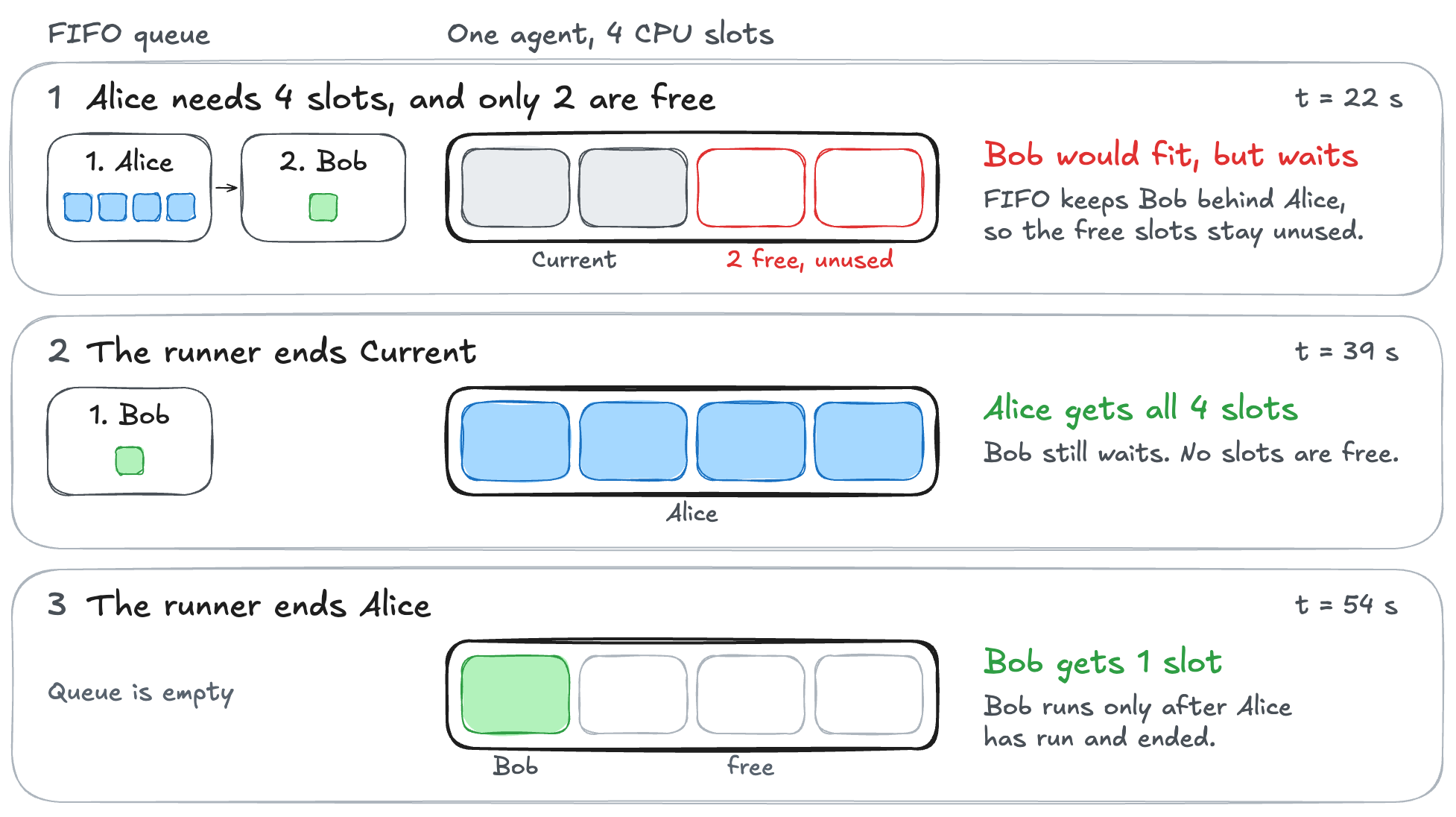
The figure shows three of the five checkpoints from 45 saved API samples and their scheduling history. The filled slots show agent-reported resource accounting, excluding reservations, rather than measured CPU activity. API queries are sequential. The elapsed times describe this run, not a performance benchmark.
Placement fragmentation
Four free GPU slots can be unusable for a request that needs all four on one machine. The second experiment supplies Backend.AI with two synthetic machines, each containing four GPU slots. Requests arrive for one slot, three slots, and then four slots on a single machine.
With DISPERSED placement, the one-slot request goes to the first machine and the three-slot request goes to the second. Three slots remain free on the first machine and one on the second. The final request cannot fit, despite four free slots across the inventory.
CONCENTRATED puts the one-slot and three-slot requests together on the first machine. The second machine retains all four slots for the final request. Every request fits in the same initial inventory.
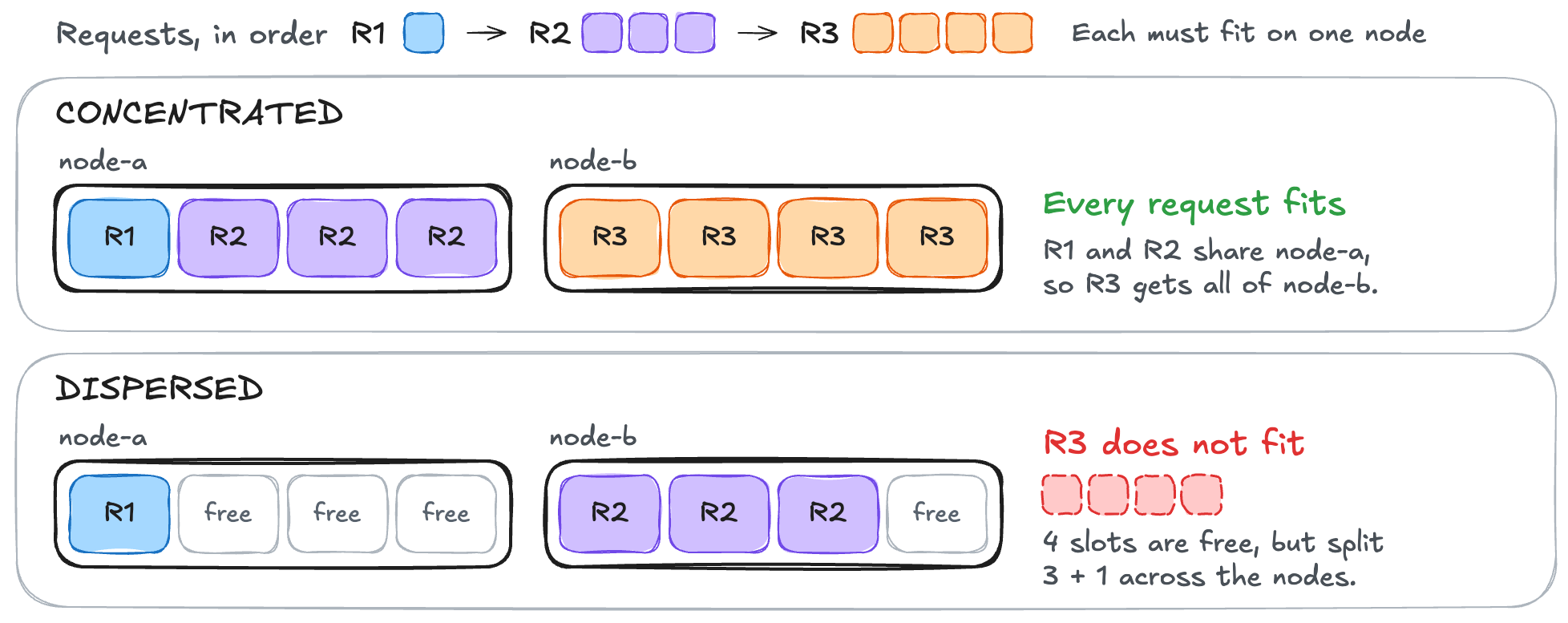
Reversing the order of the machines still leaves the final request blocked under DISPERSED. Putting the four-slot request first, however, lets every request fit under DISPERSED or CONCENTRATED. Operators can change this release’s default policy, DISPERSED, but choosing CONCENTRATED does not move existing workloads to free space.
We called Backend.AI’s selector factory and placement code directly. The saved results record successful placements and requests rejected by resource checks. We did not start containers or run GPU workloads, so the experiment does not tell us which policy delivers higher throughput.
Idle reclamation and saved work
Backend.AI reclaimed an idle session’s capacity while active work continued, and a fresh session read the saved file. The third experiment uses one running Backend.AI agent configured with four CPU slots. This agent starts and manages the workload containers on the compute node. An interactive Python session represents an abandoned notebook, holding three slots after saving a file in a persistent vfolder. An active session holds the remaining slot and runs a CPU computation. This session lets us verify that the idle policy allows active work to continue. Another session requests one slot and waits.
The runner first observes the sessions for 75 seconds without attaching an idle policy. CPU measurements show that the notebook is idle while the active session is doing work. Without an idle policy, the notebook still holds three CPU slots. The active session holds the fourth CPU slot, so the new session cannot start.
The runner then attaches a utilization checker to both the idle session and the active session. The checker uses a threshold of 100 millicores, equivalent to one tenth of a CPU core, and requires 60 seconds of underutilization. Prometheus calculates CPU activity from cumulative CPU-time measurements reported by the Backend.AI agent on the compute node, using a five-minute rate window. During startup, it uses the available history. The runner requires actual measurements before proceeding. It also checks that the active worker process is alive before attaching the policy and after reclamation, since the five-minute average can remain high after a process exits.
Backend.AI ends the idle session with an idle-timeout reason and releases its three CPU slots. The new session takes one of the freed slots and starts, and the runner verifies its output while the active session continues running above the threshold. A newly created session mounts the same vfolder and reads a file whose SHA-256 matches the value saved before reclamation. The runner does not request termination of the idle session during the measured stage.
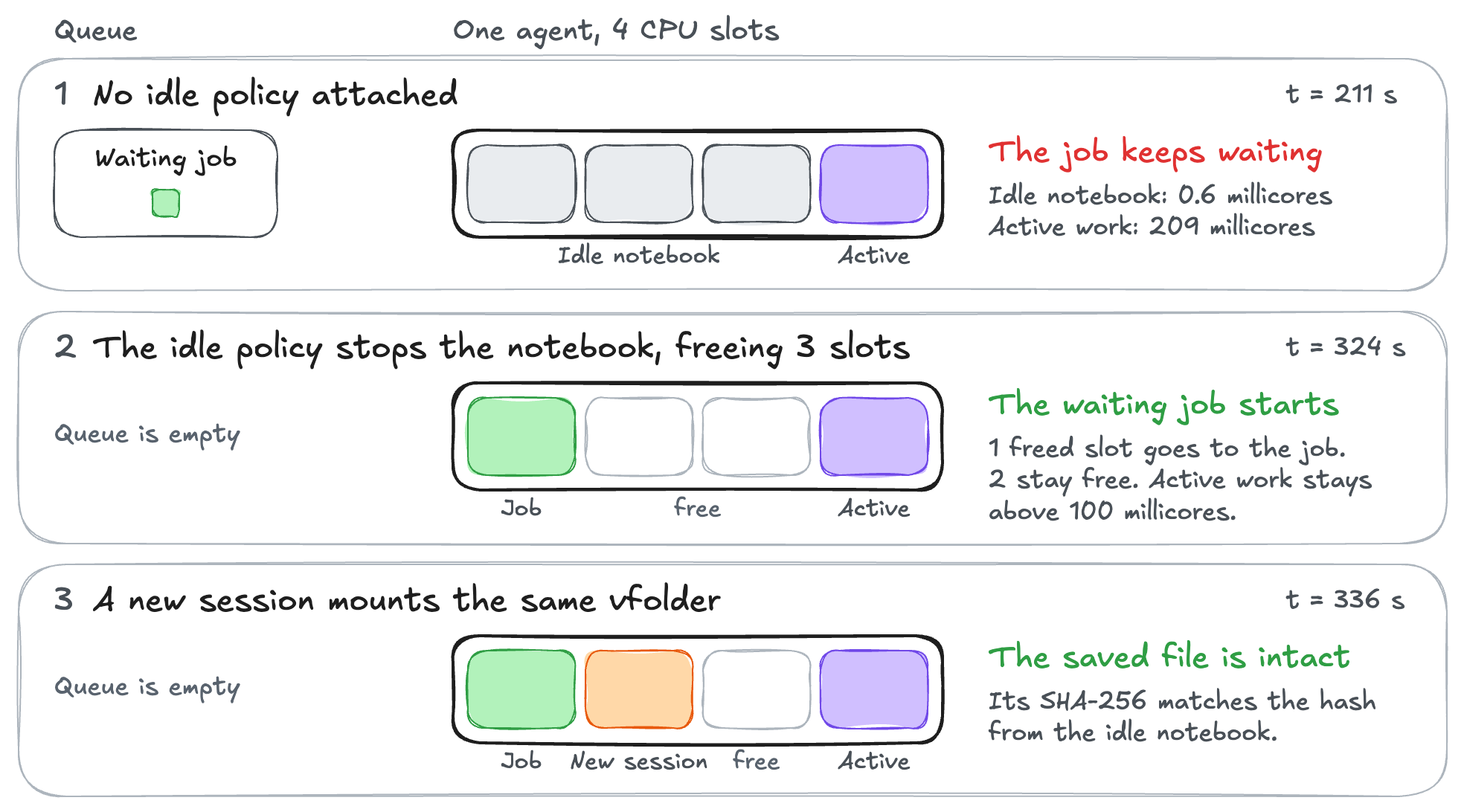
The saved run contains 248 API samples, and the figure shows three of its four checkpoints. Filled slots show allocations, and the millicore values are measured CPU rates. The waiting session was observed running about 110 seconds after policy attachment. Initial-grace processing, utilization checks, termination, scheduling, and startup add delay beyond the configured 60-second duration.
The experiment verifies automatic resource release and persistence of saved files. It does not restore unsaved process memory or measure physical GPU performance. Final cleanup terminates the remaining sessions and removes the experiment’s checker. It then waits for the vfolder’s storage deletion to reach delete-complete, purges its database record, and removes the infrastructure.
References
Documentation was checked on November 3–5, 2026.
AI21. From manual negotiation to automated scheduling: How AI21 manages its GPU fleet with Kueue. October 4, 2026.
Runway. Borrowing the Night: Reclaiming Idle Inference GPUs for Research. July 2, 2026.
Baseten. How the Baseten Delivery Network (BDN) makes cold starts fast. April 9, 2026.
Roblox. Running AI Inference at Scale in the Hybrid Cloud. September 17, 2024.
Runway. No Idle GPUs: Managing Research Compute at Runway. April 27, 2026.
Lablup. Backend.AI on DGX Spark: Open source installation guide. June 22, 2026.
Lablup. Sokovan Orchestrator: Reliable session scheduling for Backend.AI. December 8, 2025.
Lawrence Berkeley National Laboratory. Open OnDemand Overview.
Backend.AI. Install Backend.AI Agent. Accelerator requirements and edition boundary.
NVIDIA. Memory-Enforced GPU Sharing in Kubernetes with NVIDIA CUDA 13.4. October 27, 2026.
Backend.AI 26.9.7. Virtual Folders API. File-upload sessions.
Backend.AI WebUI 26.9. Overview. Environments, storage support, and Enterprise integrations.
Lablup and VAST Data. Agent coding at long context: What KV cache offloading on VAST Data & Backend.AI buys you. June 16, 2026.
Backend.AI WebUI 26.9. Deployments. Replica management and scaling settings.
Kubernetes. Overview. Container management, services, batch workloads, and extensibility.
SchedMD. Slurm Overview. Resource allocation and job scheduling.
Lablup. Backend.AI Slurm Frontend: Keep Slurm, Gain a Modern AI Platform. October 27, 2026.
NVIDIA. Running Large-Scale GPU Workloads on Kubernetes with Slurm. April 9, 2026.
SchedMD. Slurm and/or/vs Kubernetes. SC23 presentation, 2023.
The honest answer to the eight-GPU problem is that it's never really a GPU problem, it's a checkpointing problem with a scheduling bill attached. Training that can't be interrupted and serving that can't be late are both fine until they want the same card at the same minute, and then somebody has to write down who loses. I do like that the article admits the boring bit out loud — spare capacity for bursts means either idle hardware or requests waiting for a job to politely die and a replica to reload.