

AI agents are becoming teammates. They join team conversations, edit shared documents, and take on ongoing assignments. Supporting both people and agents as teammates requires rethinking the basic design of collaboration platforms in areas such as permissions, shared state, task ownership, and human control.
In The Architecture of Multi-Agent Systems, we examined how systems assign work to agents, pass context between agents, manage state shared by multiple agents, and verify agent outputs.
This post uses examples from open-source projects to explore the following aspects of collaboration between humans and AI agents.
Apps and integrations for human-AI collaboration
Private context and shared access
Onboarding
Shared documents and concurrent edits
Human guidance and agent responses
Ongoing tasks and follow-up work
Shared knowledge and reusable skills
Proactive participation
Collaboration between people
Design choices in human-AI collaboration
Apps and integrations for human-AI collaboration
Some products add an assistant to existing Slack channels. Others provide a shared workspace for conversations, documents, and tasks.

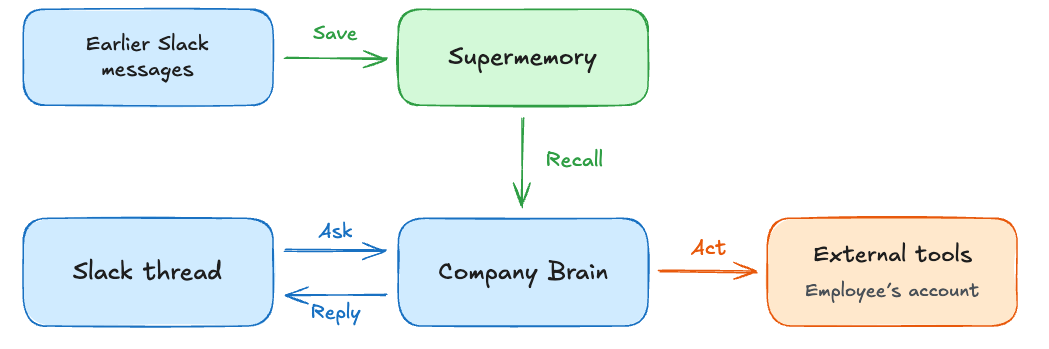
Company Brain is a Slack app with a web dashboard for setup and settings. The assistant saves useful information from team conversations in Supermemory and acts through connected tools. Company Brain joins work already happening in Slack. When an employee asks a question, the assistant retrieves, or “recalls,” relevant information saved from earlier conversations, such as decisions, owners, and project context, within the allowed scope. Actions such as creating an issue run under the employee’s own account.
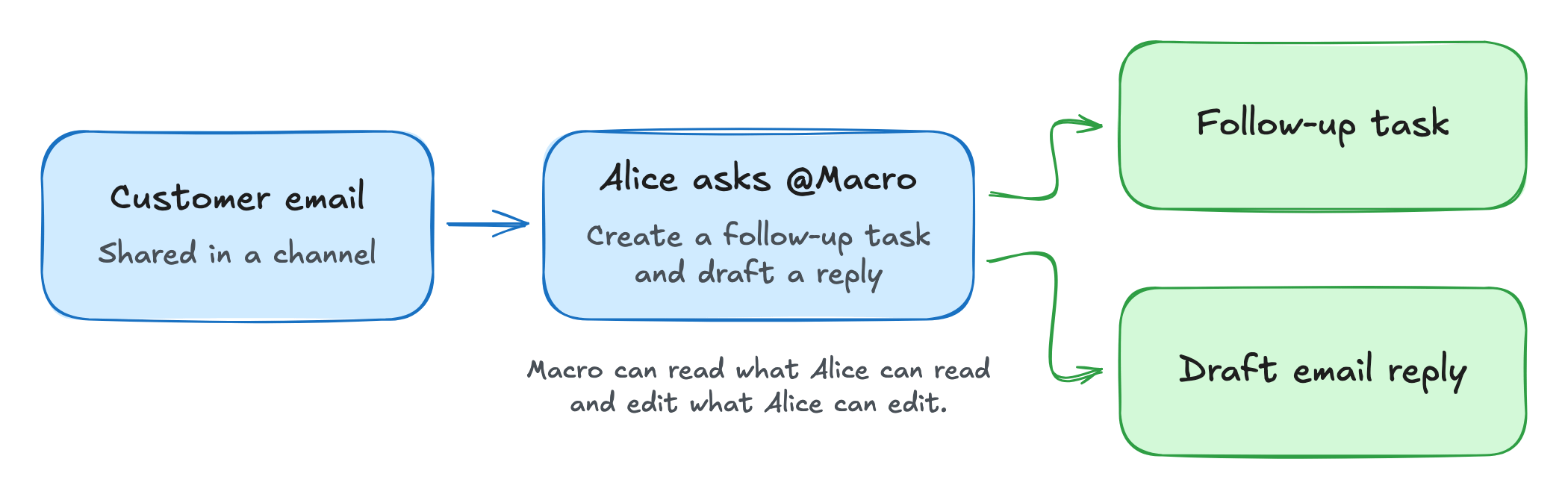
Macro combines email, documents, messages, tasks, and AI agents in web, desktop, and iOS apps. Macro's built-in agents can act on email, tasks, and documents managed in Macro. People invoke an agent in a dedicated chat or by mentioning @Macro in a channel. The agent can read the discussion, search workspace content, create and assign tasks, draft email replies, and edit native Markdown documents, using the requester's permissions. For example, Alice can share a customer email in a channel and ask @Macro to create a follow-up task and draft a reply. The agent replies in the thread. The email, task, and agent conversation can be linked so colleagues can trace the work back to the request.
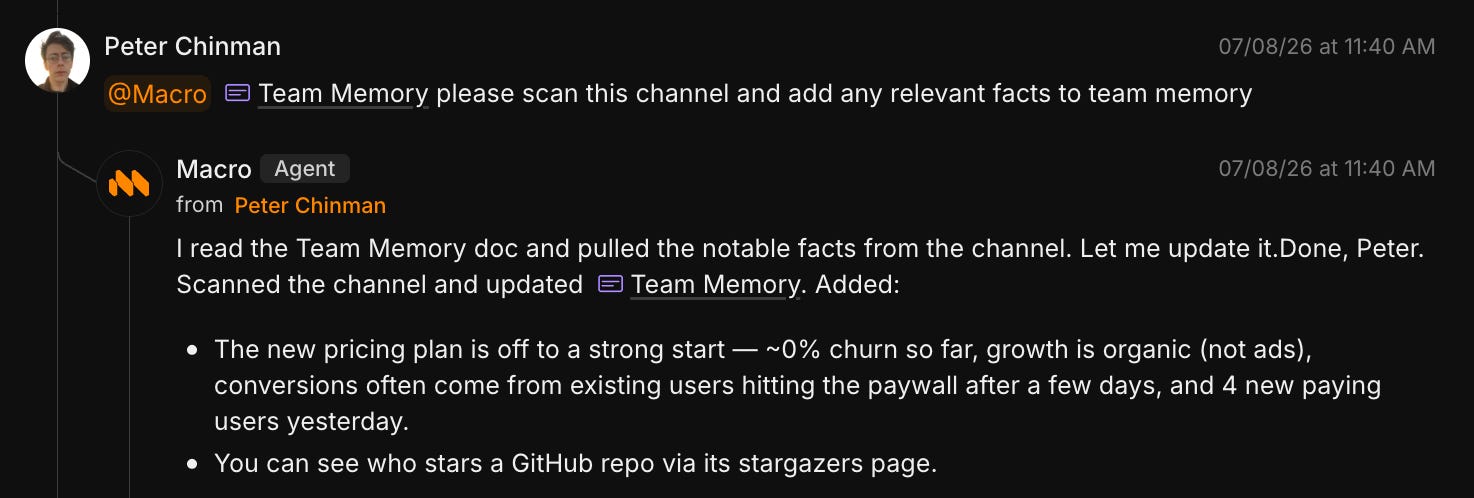
@Macro to scan a channel and update the linked Team Memory document. The agent reports its changes in the same thread. Screenshot from Macro’s agent documentation. Source.
Buzz is a desktop workspace from Block where people and AI agents use channels, threads, and canvases. Agents can run buzz-cli commands to read and post messages and edit canvases. People and agents participate in the same workspace. People use the desktop app, and agents can use the CLI to review earlier contributions and continue the work. Canvas revision history includes edits by people and agents, with an author recorded for each saved revision.
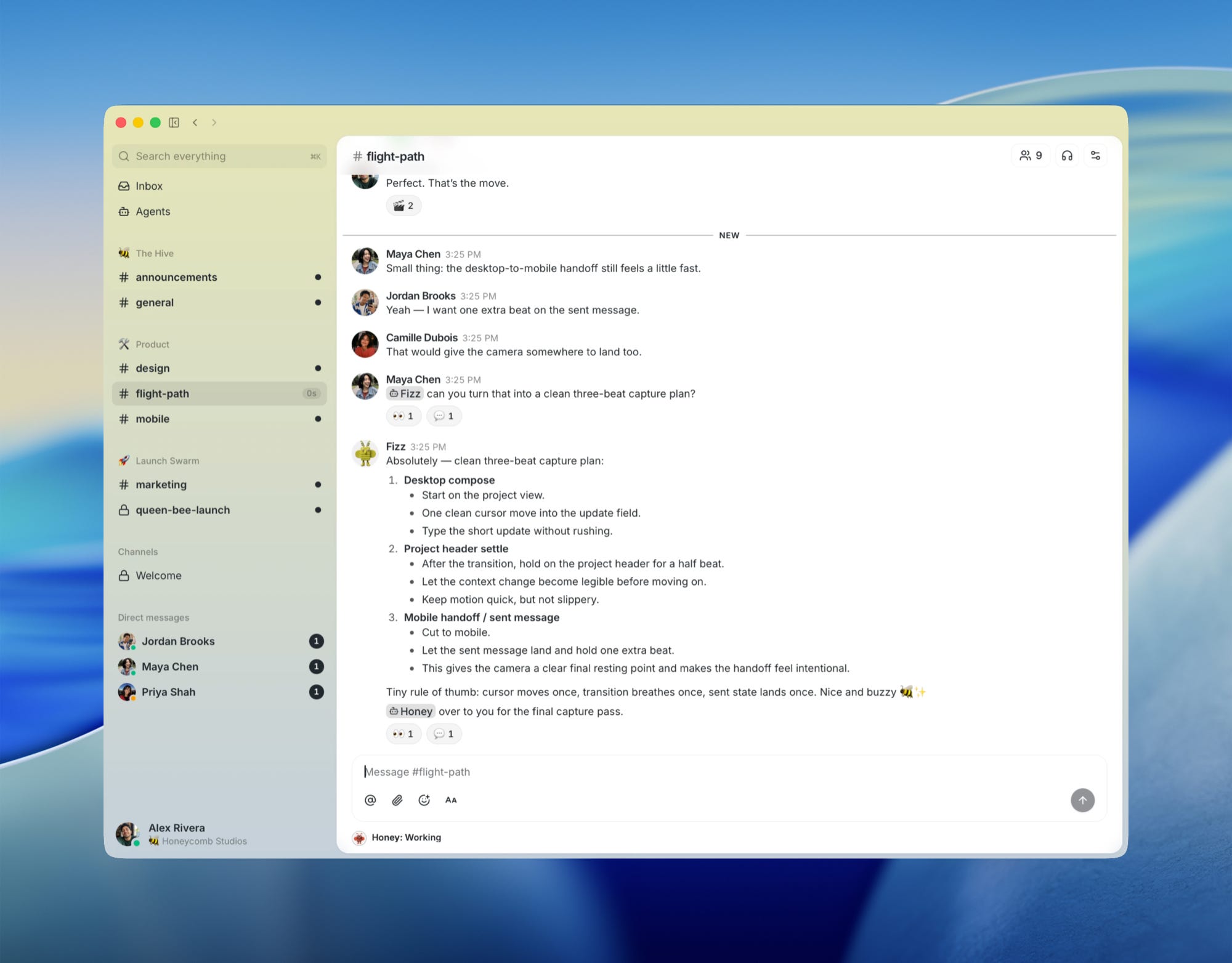

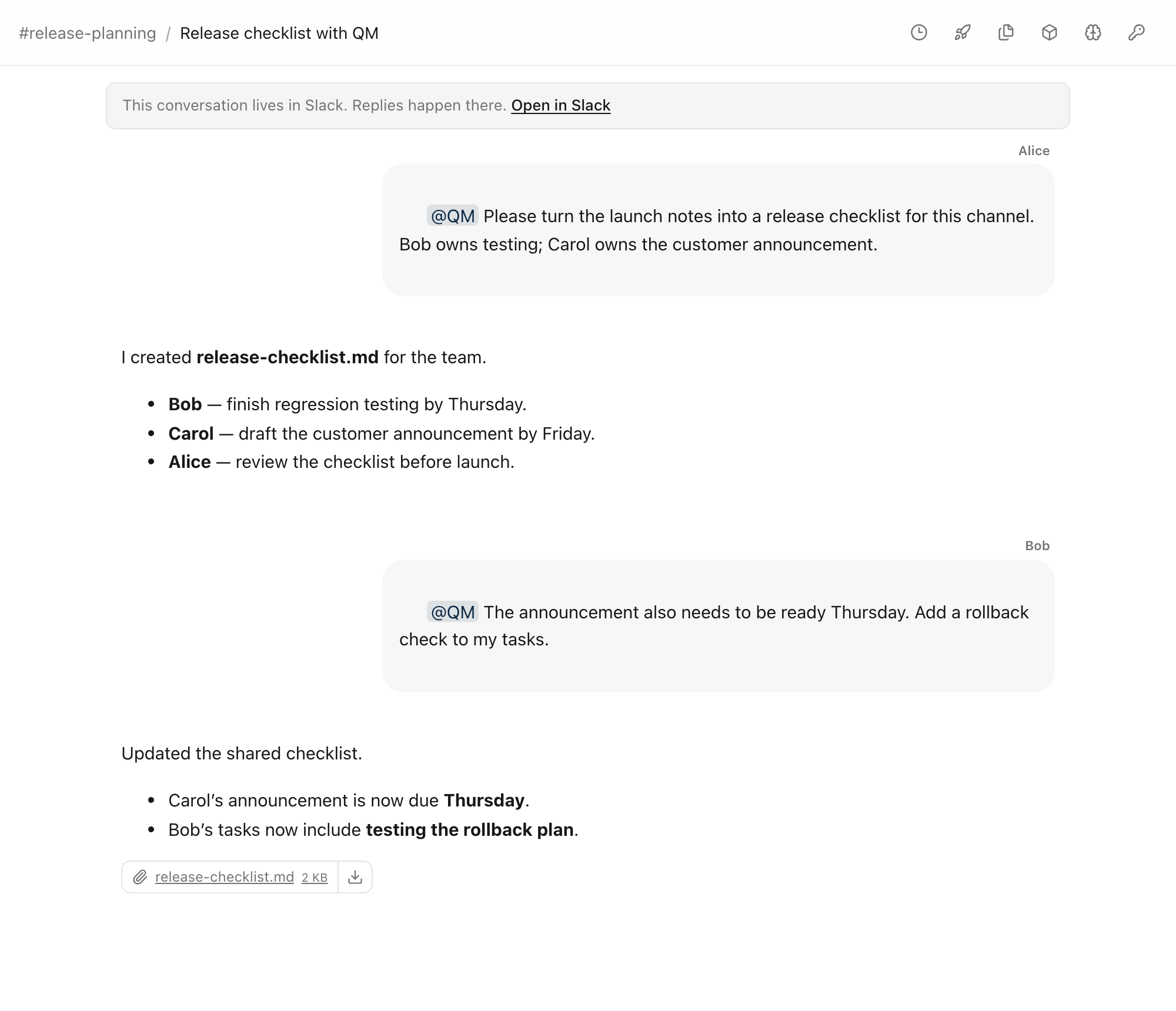
QM is a web application built by Y Combinator, with an optional Slack app. Employees can work privately with an agent or collaborate with colleagues and an agent in shared channels, group conversations, and projects. Personal workspaces and shared rooms keep separate files, memory, scheduled work, and persistent computing environments. The company can switch between agent tools such as Claude Code and Codex while keeping the same personal workspaces and shared rooms.
Private context and shared access
People need control over what private information an agent can share with colleagues and whose accounts it can use to act.

Suppose Alice starts a report with private notes and issues the agent reads through her GitHub account. Bob joins the project channel. Without separate rules for resource access, agent actions, and output visibility, Bob’s requests could expose Alice’s private information or trigger actions through her GitHub account.
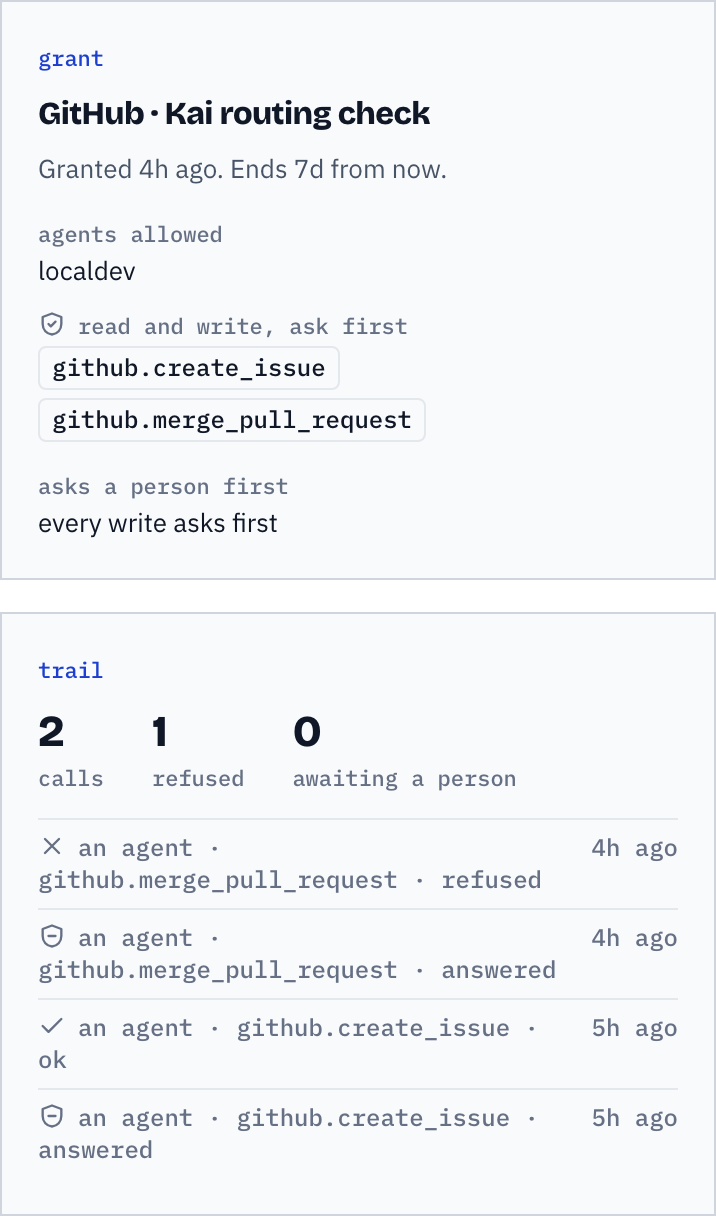
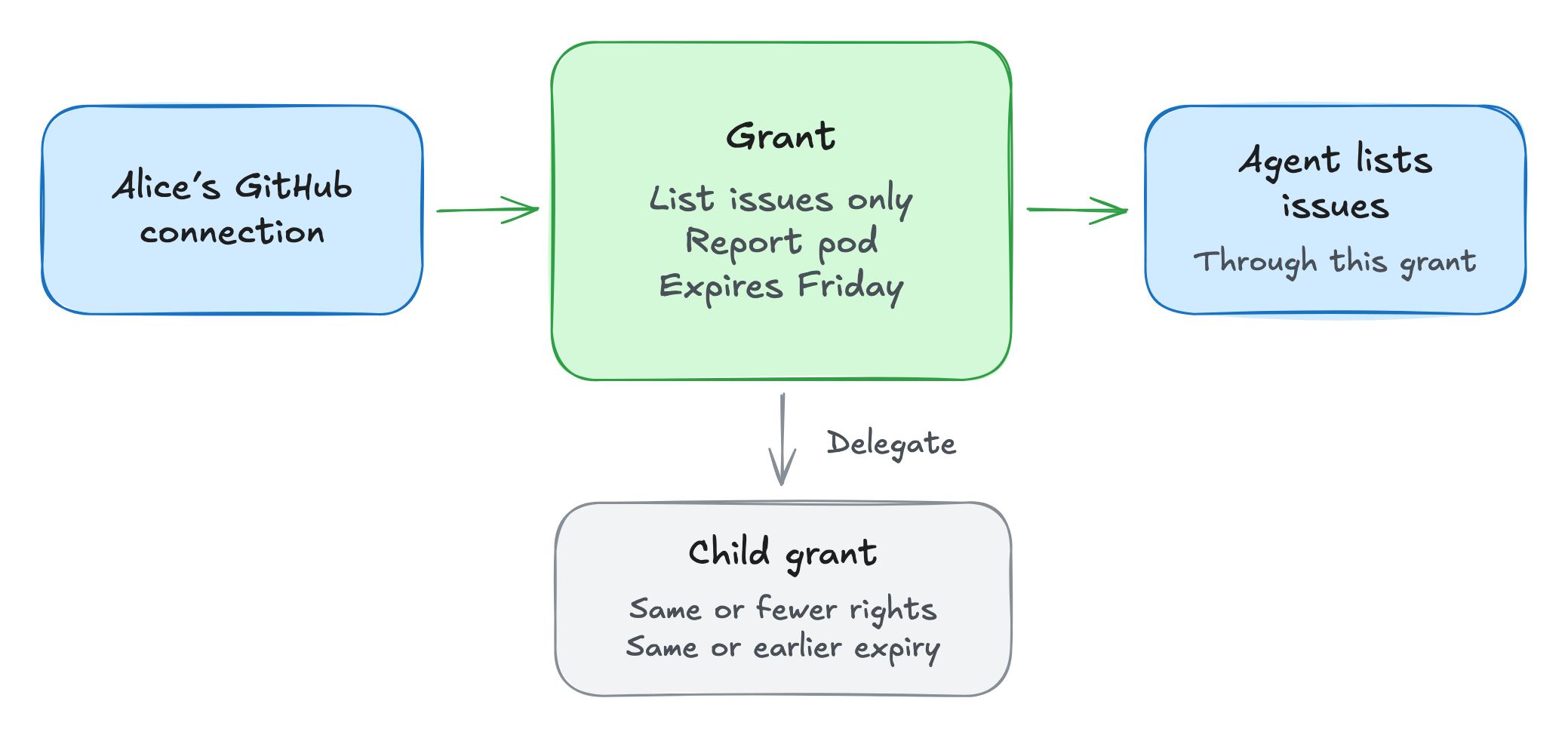
Commonly is a web workspace with Slack and other messaging connectors. It groups people, agents, conversations, and work into rooms called pods. People explicitly grant access for shared work. Alice can grant a pod or agent seat limited use of her connected GitHub installation, for example, permission to list issues for the report. The grant records the allowed tools, audience, expiry, operating mode, and an optional call budget. Alice can revoke the grant.

If Alice delegates permission to list issues, the recipient can only list issues. The delegated permission must expire at or before the time Alice’s own permission expires. Revoking the parent also revokes its child grants. For a pod grant, the invoking agent must belong to the pod and be in the grant's allowed audience. Colleagues can cooperate through Alice's connection while she controls the tools and duration of access.
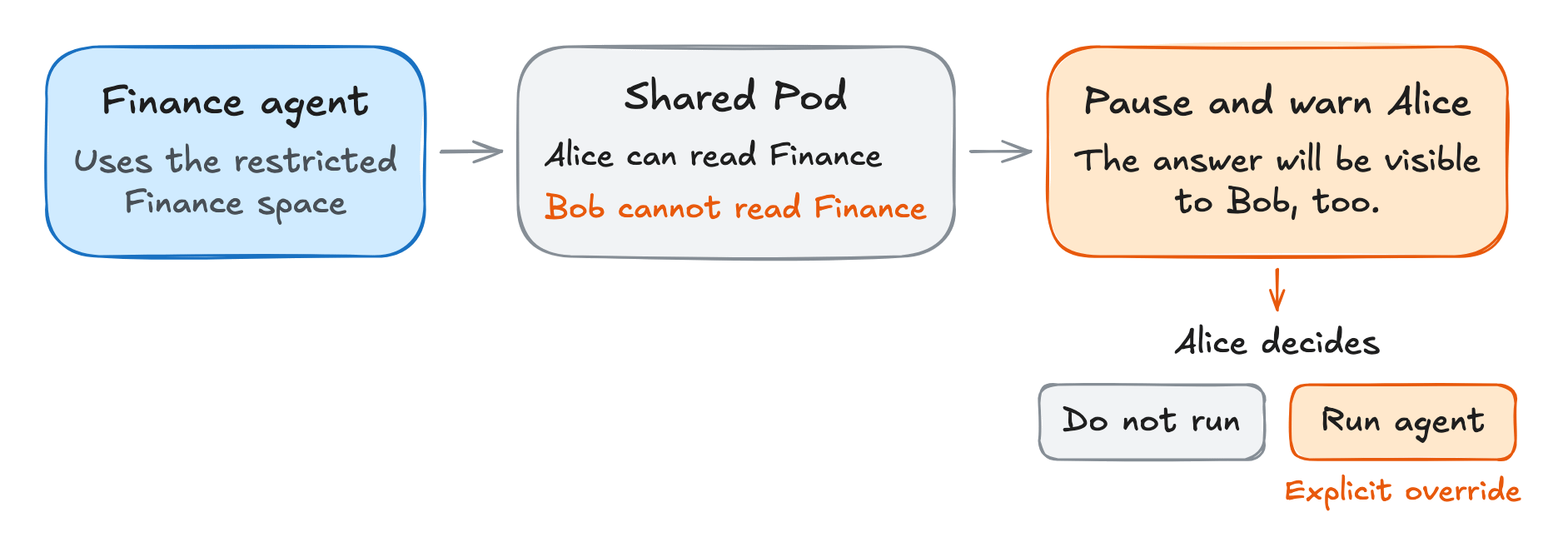
Dust is a web platform for workplace agents connected to company knowledge and tools, also accessible through its Slack app and Chrome extension. Dust warns before an agent shares answers with Pod members who lack access to its source information. Suppose Alice's agent uses a restricted Finance space. Alice has access, but Bob does not. If Alice runs that agent in their shared Pod, Bob can read its answers.
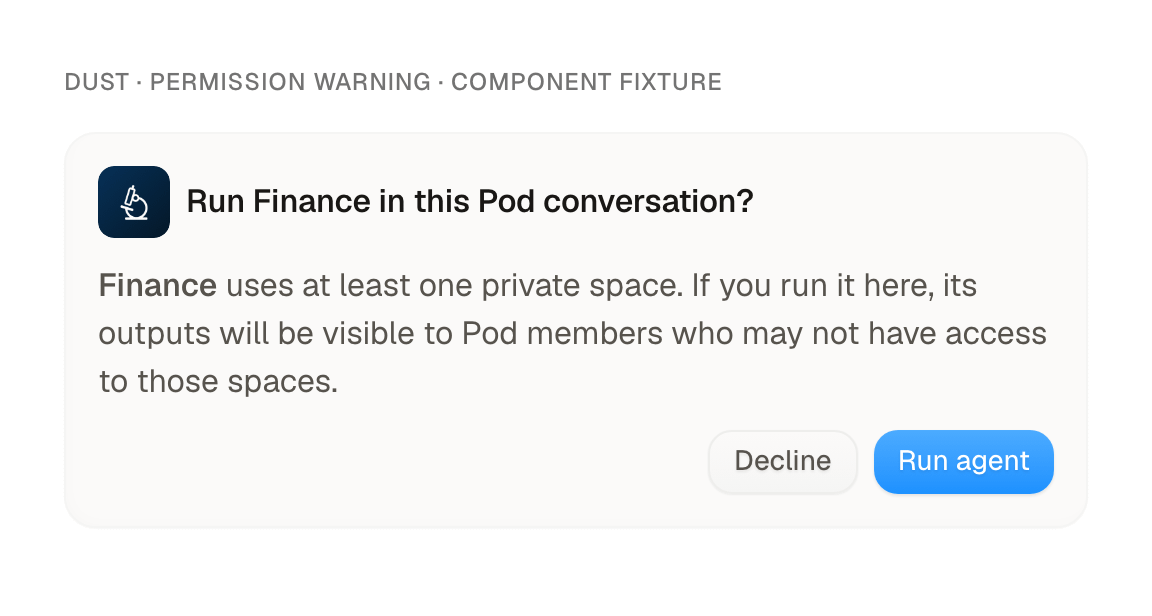
Dust checks whether Pod members can access the spaces the agent is configured to use, such as the restricted Finance space. In a restricted Pod, the agent can run directly when all active members have access to every restricted space in the agent’s configuration. Alice has access to the Finance space, but Bob does not, so Dust pauses the invocation and warns Alice that the output will be visible to Pod members. Alice can cancel or explicitly choose “Run agent.” The check creates a disclosure decision for the person invoking the agent.
Rowboat is a desktop AI assistant that connects to Harbor, its shared-space service. A Harbor space is a workspace with messages, files, and whiteboards where people and their agents can collaborate. A person can keep a private assistant conversation while contributing to shared work. In a shared conversation, @rowboat calls the assistant belonging to whoever wrote the message. Alice calls her assistant; Bob calls his. Replies from Alice’s assistant are attributed to Alice. Its instructions say to ask Alice private questions in her local chat, but the assistant could still include information from that private chat when replying to the group.
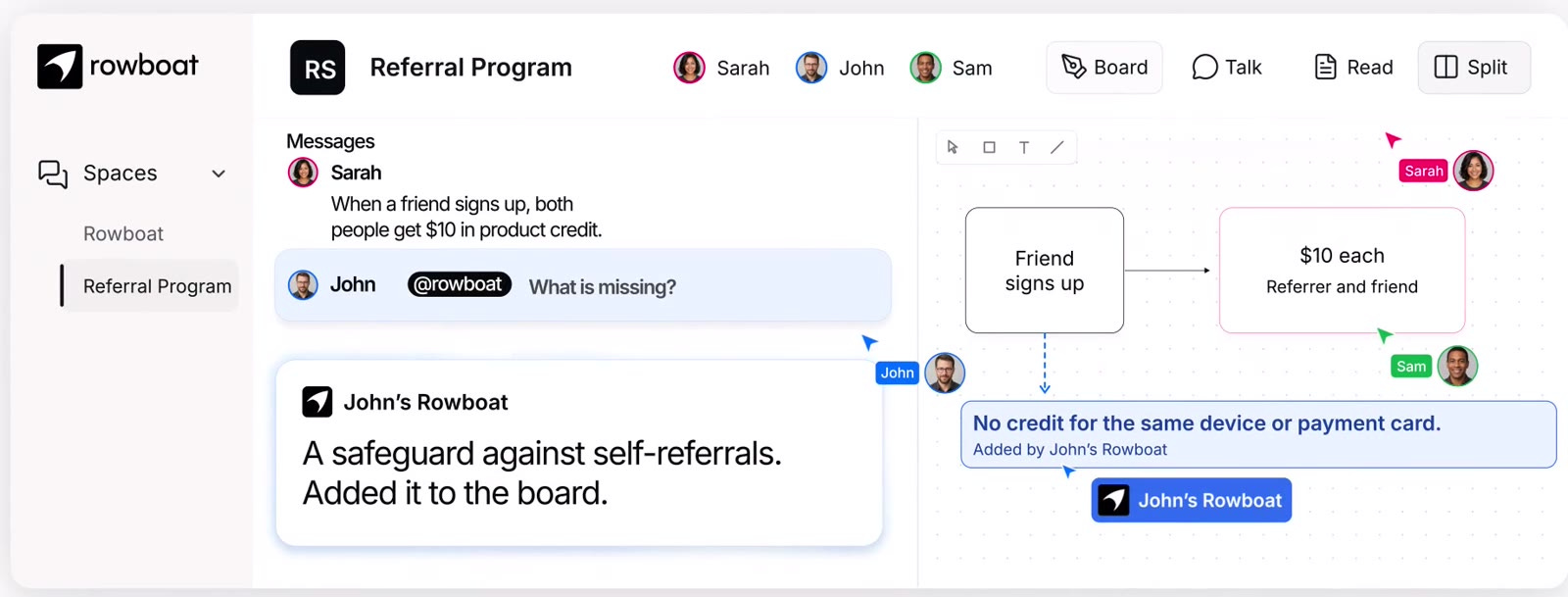

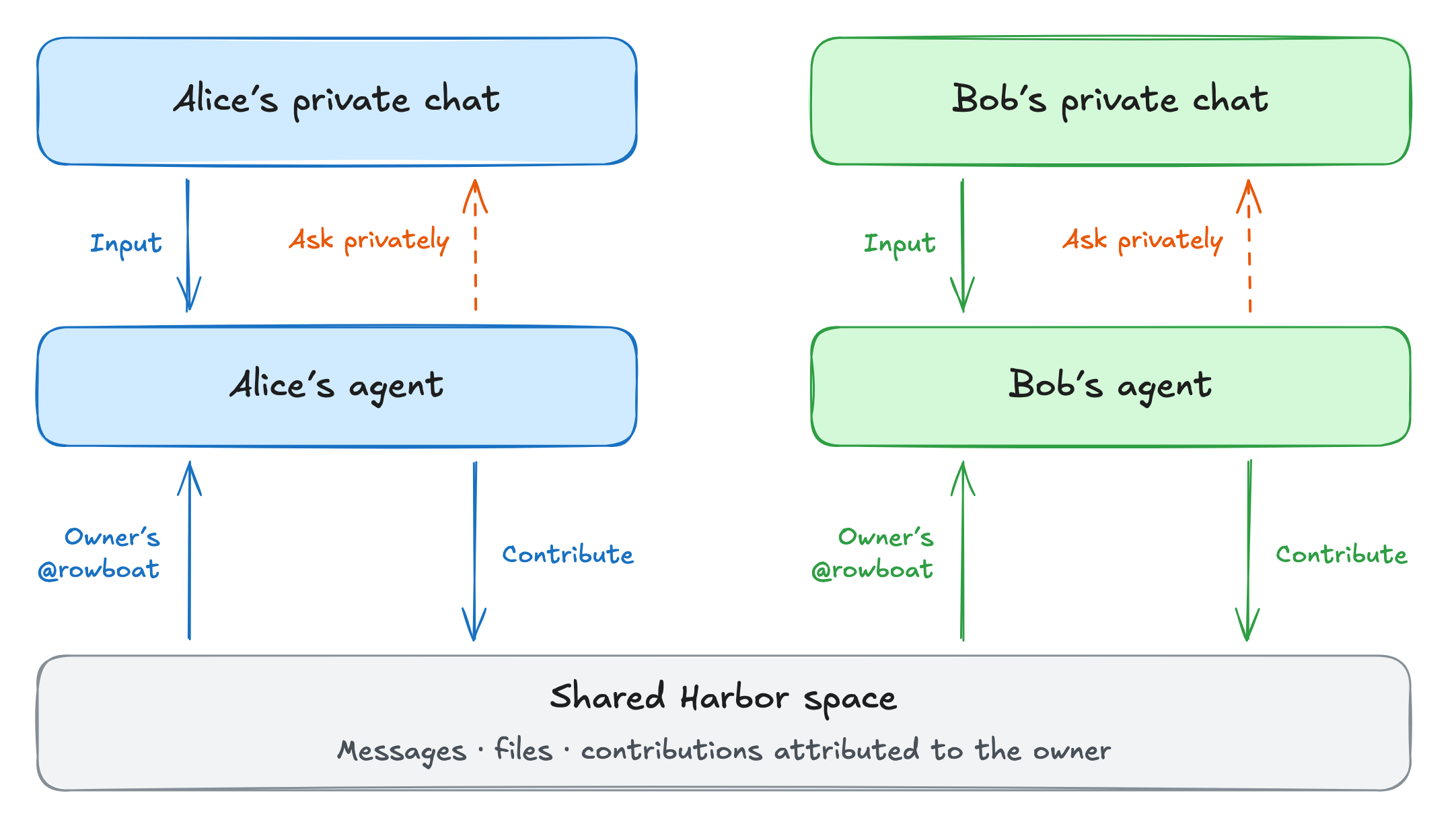
An agent joining a shared conversation changes the audience for personal context and actions. Commonly’s grants, Dust’s Pod checks, and Rowboat’s personal conversations give people different ways to manage that transition.
Onboarding
An agent taking on a new role needs to learn who owns the work, what colleagues know, and how the team expects to work together.

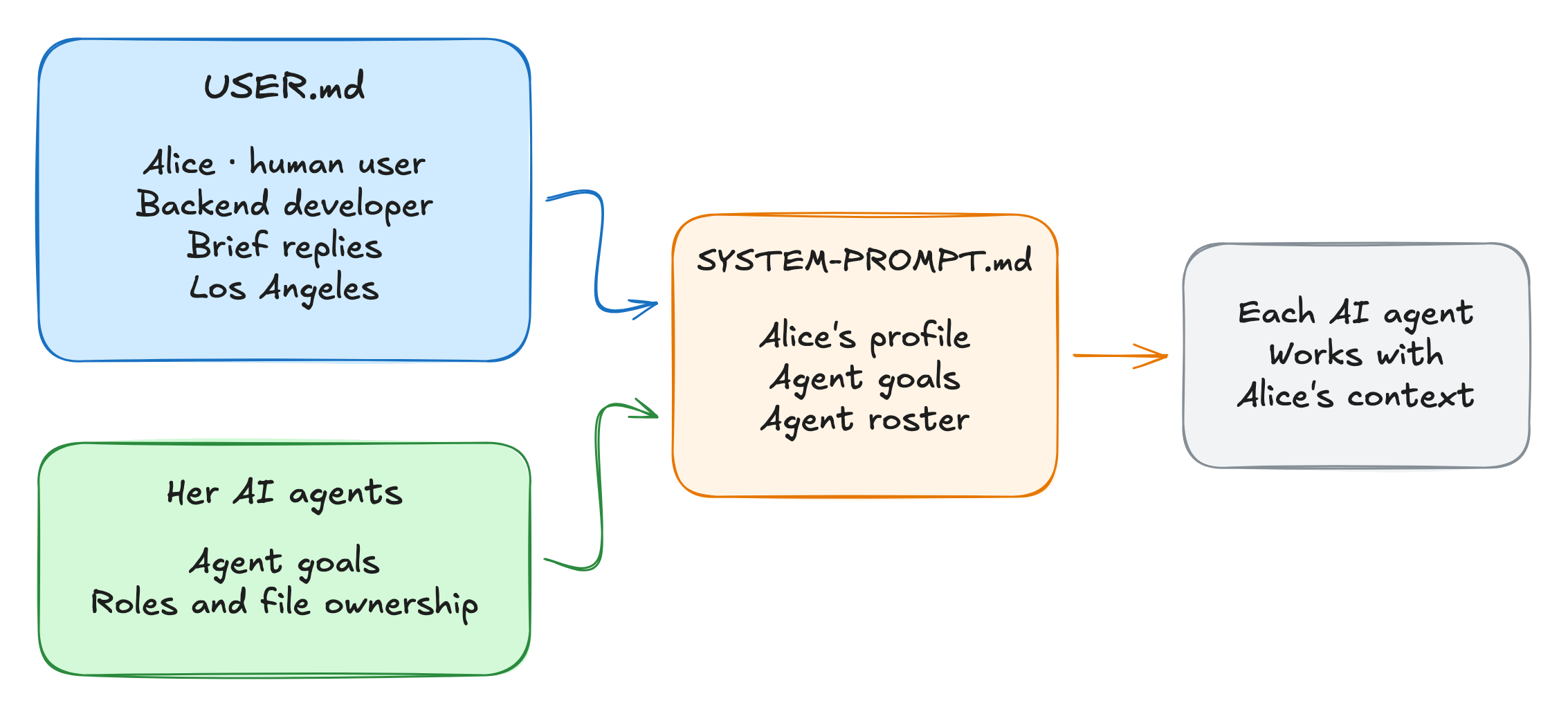
Teammates is a CLI for one human working with multiple AI agents. Developers can share agent definitions through Git. Each developer’s personal profile is stored in a local .teammates/USER.md file, which is excluded from Git. If the profile is missing or still a template, the CLI asks for the developer’s role, experience, working preferences, and timezone.
When preparing the agents for work, the CLI includes the human user’s profile in each agent’s system prompt, alongside that agent’s goals, accumulated knowledge, and a roster of the other AI agents. Onboarding supplies context that agents can use during later work. For example, if the user says they know Go but are new to React, an agent helping them with React code could explain unfamiliar concepts in more detail.
The roster lists each AI agent’s role and the parts of the project it is responsible for. These records inform model behavior, but they do not enforce ownership or establish that the agent understands the person correctly. Working with the agent helps people understand what it can and cannot do.
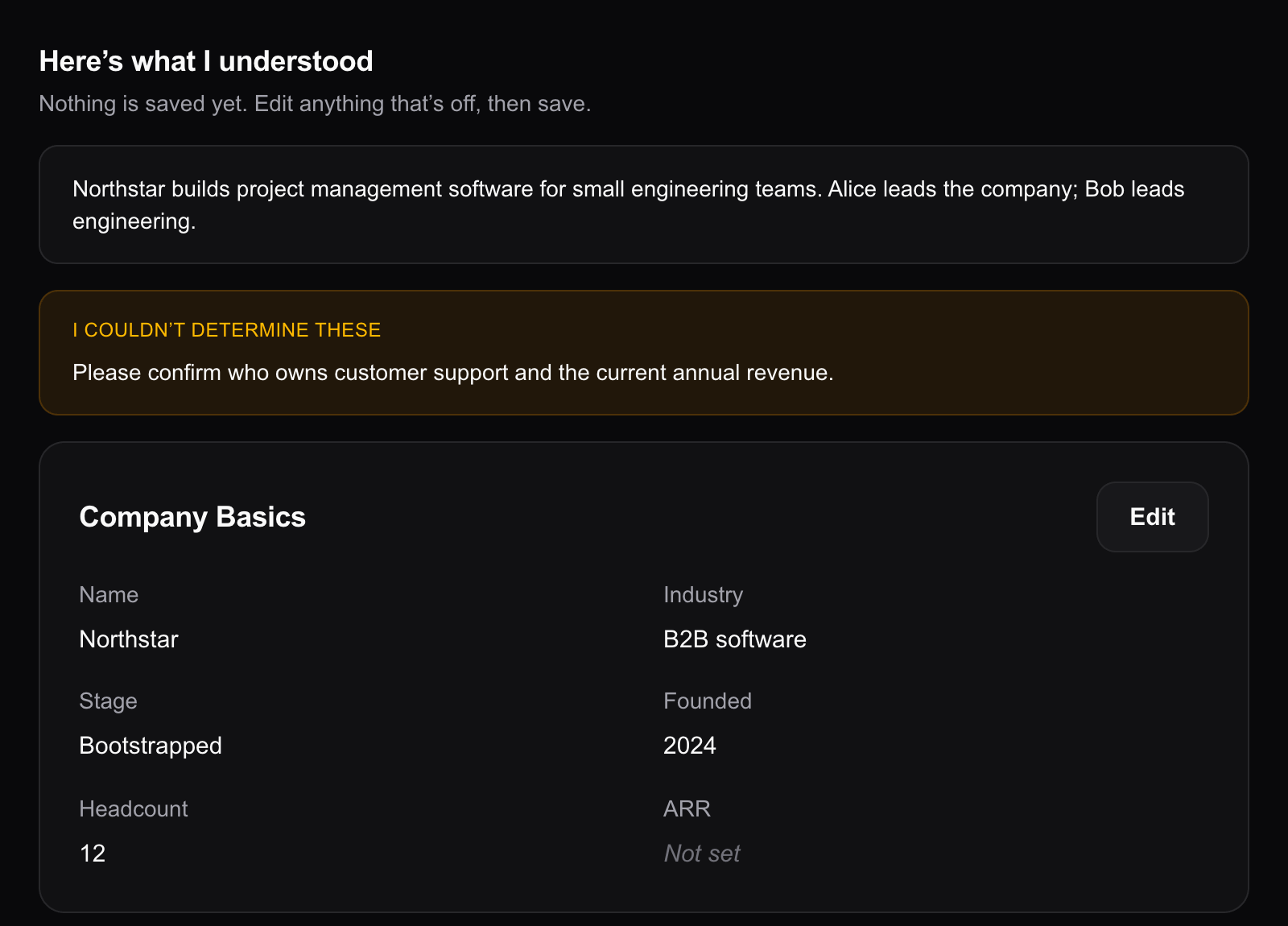
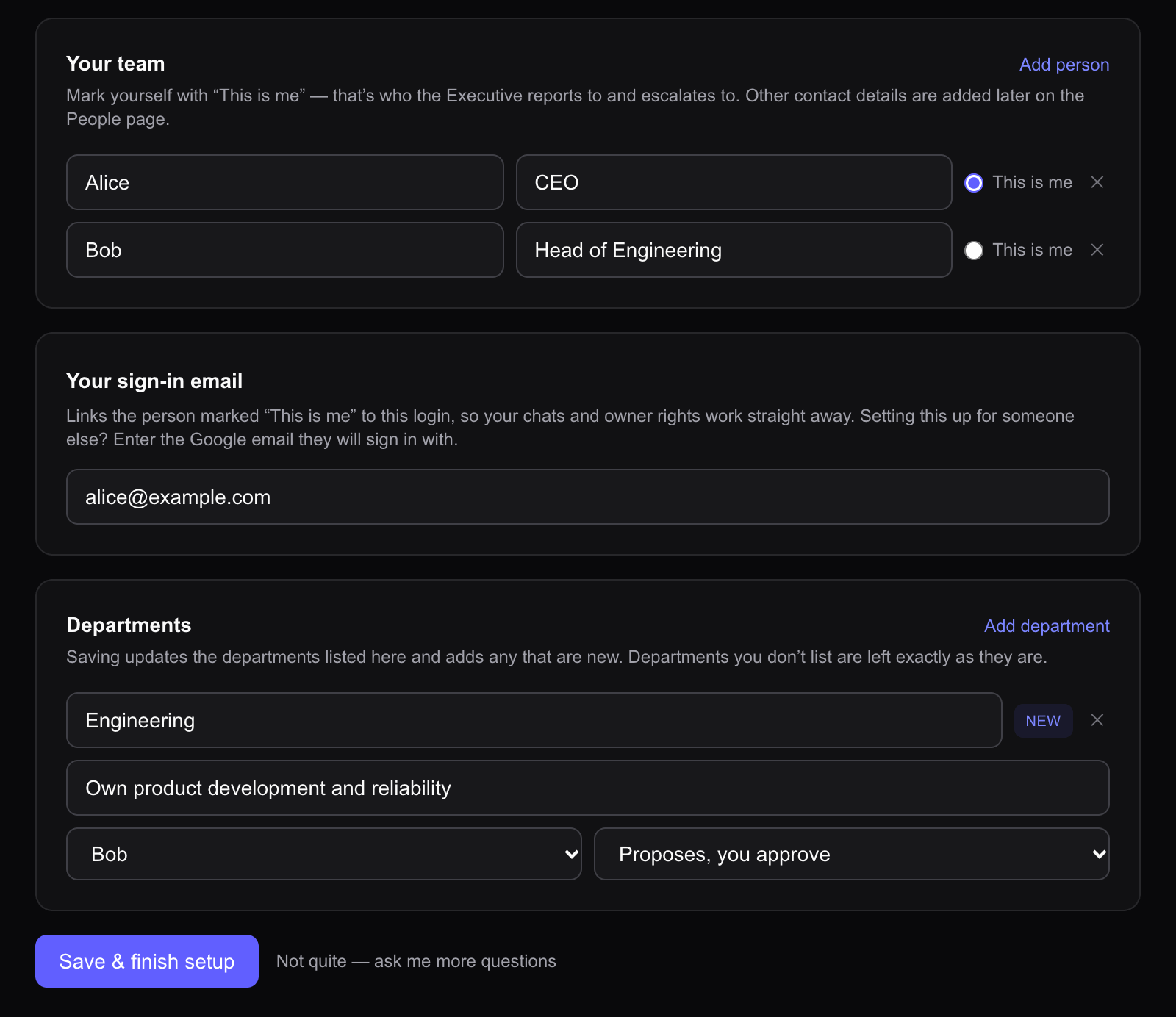
OpenExecutive is a web application for working with an AI executive assistant. During company setup, a person describes the business and can attach supporting documents. The agent asks up to eight clarifying questions, then uses the person’s answers and supplied information to draft a company profile, a list of the company’s human leaders and their roles, and a department list.
Humans can correct the agent’s understanding of the organization before saving it for later work. The review screen lets them edit the draft and displays notes about information the agent could not determine. For example, users can correct a department’s responsibilities before saving. The saved company profile becomes part of the agent’s context in later conversations.
Shared documents and concurrent edits
When people and agents edit the same document, the workspace needs to handle overlapping changes and show who is editing.

People and agents can edit the same document, so the system needs to preserve their contributions and handle conflicting changes.
Alice asks an agent to revise a report. While the agent works from version 1, Bob edits the introduction and saves version 2. Replacing the whole document with the agent’s answer could discard Bob’s contribution. Making Bob wait until the agent finishes would prevent them from editing the report at the same time.
Rowboat’s Harbor file API includes the version the agent read in the proposed change. When the base is current, Harbor can apply the proposal directly. If the file has changed and the base, current file, and proposal are all text, Harbor attempts a three-way merge. A clean merge produces a new version. A conflict returns the current content, conflicting regions, and recent change history without writing the proposal.
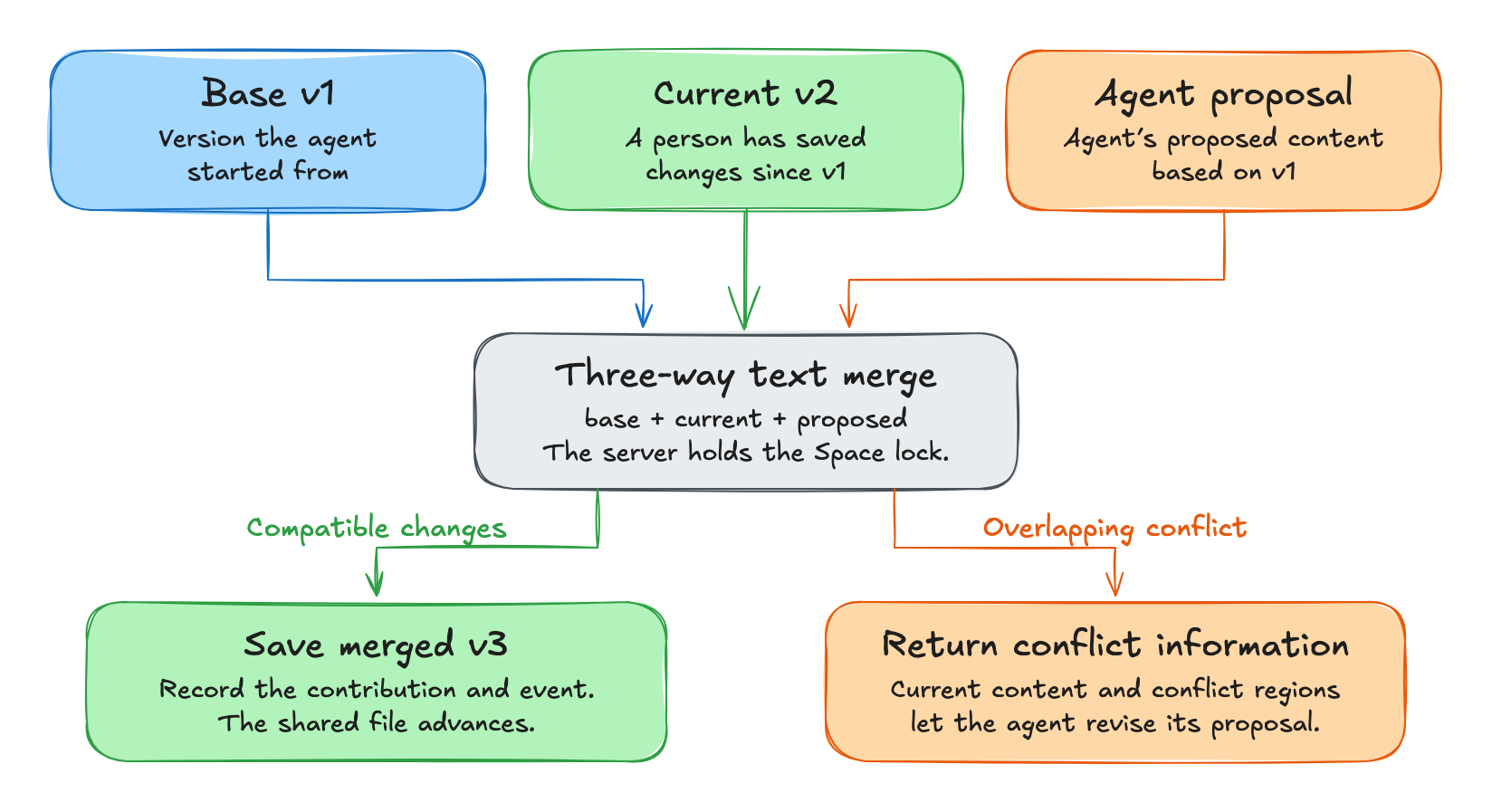
Bob can continue editing while the agent works, and the agent can learn that its proposal needs revision. The history preserves contributions from people and agents. Stale binary proposals return a conflict without attempting a text merge.
rowboat/apps/harbor/packages/server/src/service.ts
const result = merge3(base.content ?? '', current.content ?? '', proposal.content ?? '');

if (result.outcome === 'conflict') {
  // Nothing written. Decision 6: everything needed to retry, one round trip.
  return conflictOf(result.regions);
}

// ...
const version = asset.version + 1;
const changeSet = await this.commit(spaceId, asset, input, attribution, version, {
  content: result.content,
  blob: null,
});
return { outcome: 'merged' as const, changeSet, version, mergedContent: result.content };
The merge compares text changes. It can combine edits to different parts of the document, but it cannot determine whether two separately edited facts agree.
Buzz gives people in the desktop app and agents using the CLI access to the same canvas and revision history. A saved revision records its author. Restoring an older version creates a new revision that records who restored it.
The desktop editor and history restoration can save against an expected revision. When a save specifies an expected revision, Buzz’s server rejects it if the canvas has changed since that revision, giving the writer a chance to reload. The CLI’s ordinary canvas set remains unconditional, so the editing path determines whether the check applies. Buzz rejects saves with an outdated expected revision and leaves the writer to resolve the conflict, while Rowboat attempts to merge compatible text changes.
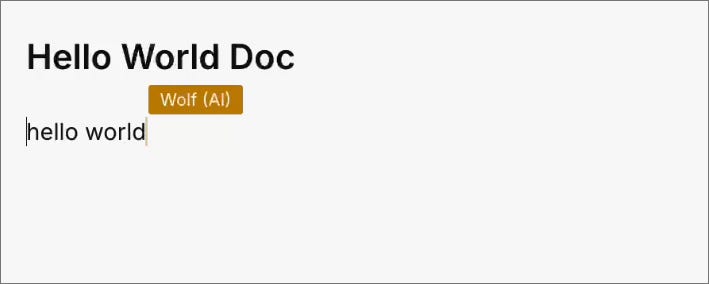
Macro makes an agent’s participation visible inside its document editor. Its editing tool checks edit access and labels the agent’s cursor with its display name, so collaborators can see where the agent is working. Macro’s agent editing tool works on native Macro Markdown documents but cannot edit uploaded PDFs or Word files.

Human guidance and agent responses
People need ways to redirect an agent’s ongoing work, correct outdated responses, and answer requests for decisions.

People continue making decisions and sharing information while an agent works. If the agent keeps following its initial instructions, it can spend time on work the team no longer needs or post an answer that is already outdated. The report is still underway when Alice changes the deadline. An agent needs to receive the correction, reconsider any outdated response, and involve an appropriate person when a decision is needed. Products differ in which of those interactions they make explicit.
Cumora is a team chat application available on the web, desktop, and in an iOS beta. People and AI agents share conversations, task boards, and calendars. Its agents must account for new messages in the room. Before posting an agent’s reply to a group conversation, Cumora normally checks for newer messages the agent has not been shown. If the server finds newer messages the agent has not seen, it holds the reply and returns those messages to the agent.
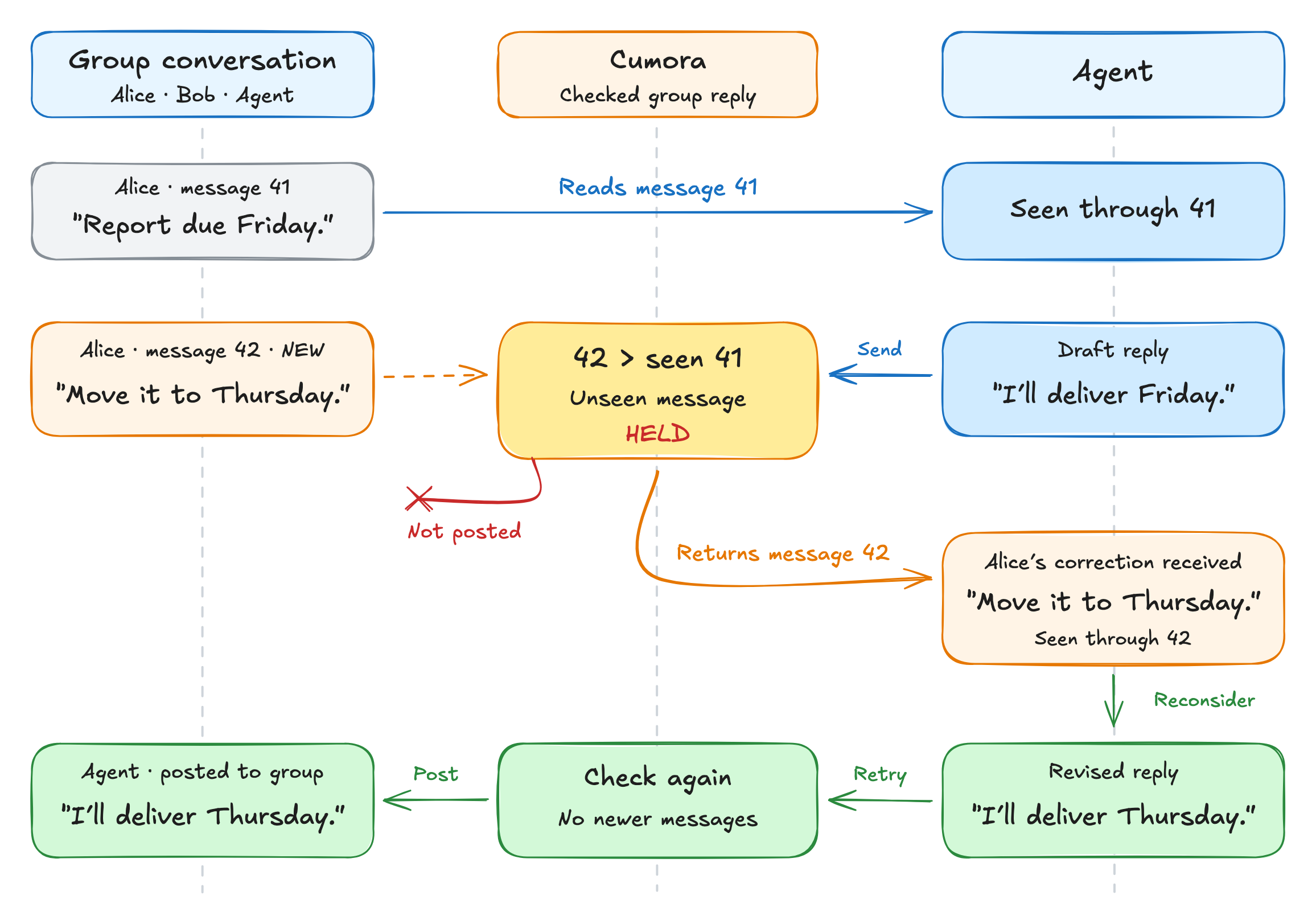
Cumora also tries to keep agents from duplicating a shared document. Before creating a document, Cumora marks the title as in use so other agents in the company can avoid creating a duplicate. If Cumora finds a recently created document with the same title, ignoring differences in capitalization and spacing, it can direct the agent to read or add to that document instead of creating another.
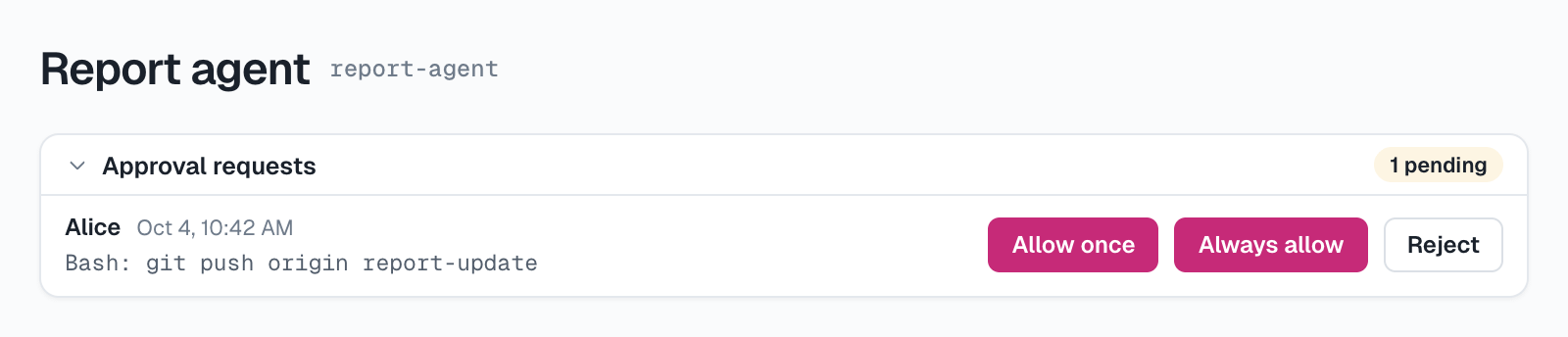
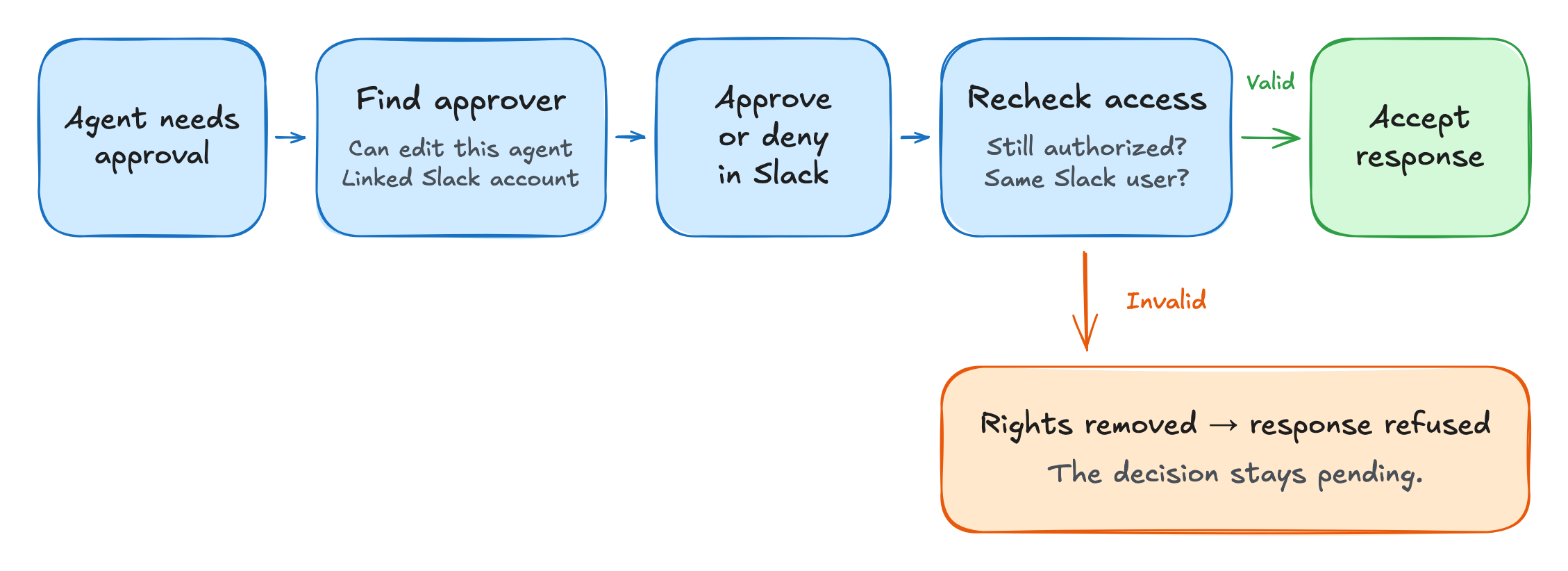
AgentConnect combines a web management console with integrations that connect AI agents to Slack, other messaging apps, and work tools such as GitHub. Decision requests go to someone with the required authority and a reachable account. For Slack approvals, the service looks for an authorized editor of the agent who can be reached through Slack. It can send the decision options to that person by direct message. The pending decision is also available through the console, even if the notification cannot be delivered.
AgentConnect checks the responder’s authority again when the response arrives. Someone who was an editor when the request was sent may have lost that role before clicking an option. The earlier notification cannot authorize the response on its own.
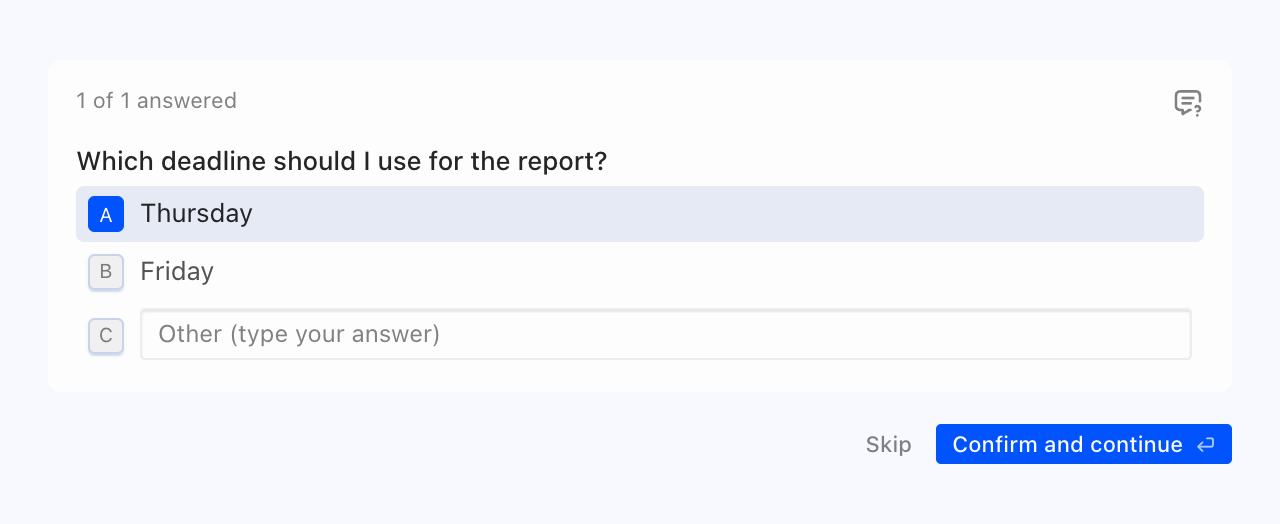
Hermes, a persistent assistant with desktop, terminal, and chat interfaces, lets people correct work already in progress. In steer mode, an eligible new message is introduced after the current tool batch finishes, before the next model call. Queueing waits for the current turn. Interrupt mode can redirect the active turn or fall back to stopping the run. In interrupt mode, input is queued while subagents or context compression are active. A clarification tool lets the agent ask the person for input and distinguish an answer from a skipped or unanswered question.
Macro lets people send follow-up messages without repeating the agent’s @mention. Before sending a follow-up message to an agent, Macro checks that the sender is human and has permission to post in the conversation. If only one agent is active in the thread, Macro checks whether the message is meant for that agent before forwarding it. If several agents are active, the person must identify the intended agent, for example by replying directly to that agent’s message.
Ongoing tasks and follow-up work
Ongoing assignments need a place where people can review progress and give follow-up instructions.
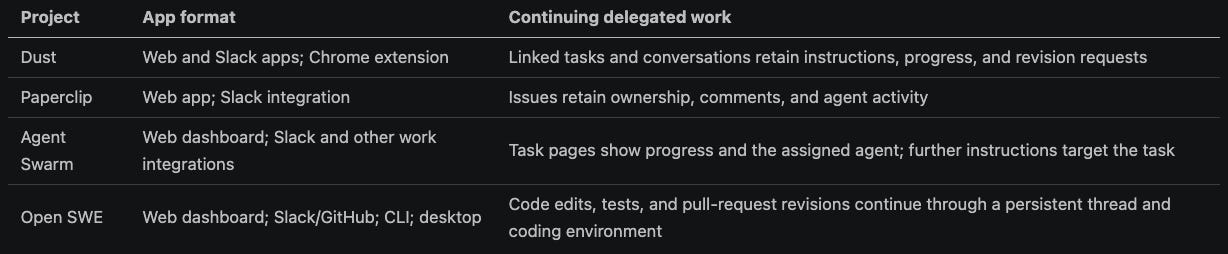
Some work lasts longer than the conversation that started it. An employee assigns an investigation, leaves for a meeting, and returns with a correction after the agent has made progress. The product needs to keep the assignment, contributions, and next decision available and understandable.
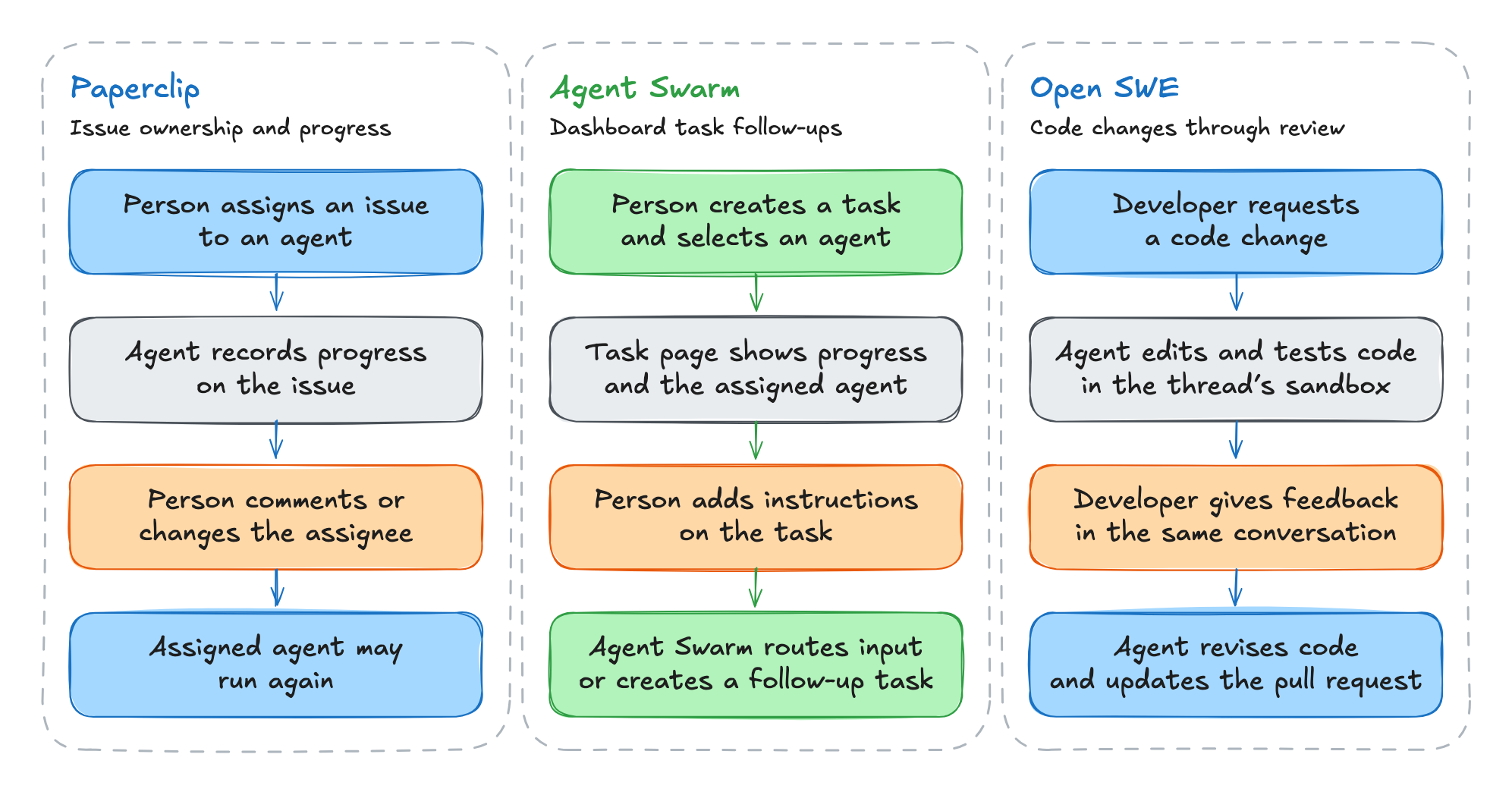
Each Dust task can link to the conversation where the agent is working on that task, so people can reopen the conversation from the task to review progress or give further instructions. Alice can edit a “Prepare report” task, attach sources, and start the agent. She can later open the linked conversation to request changes and inspect progress from the task.
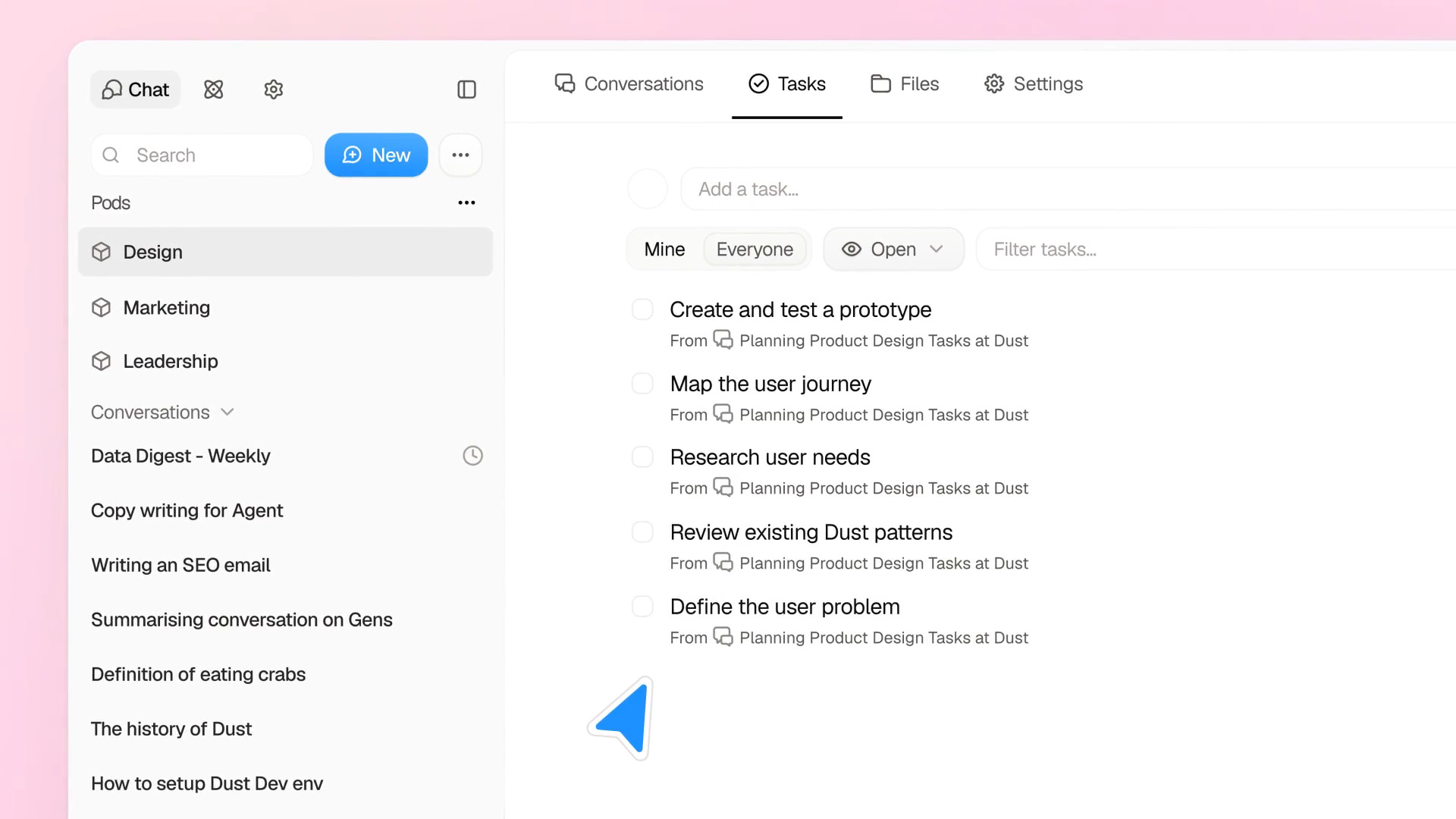
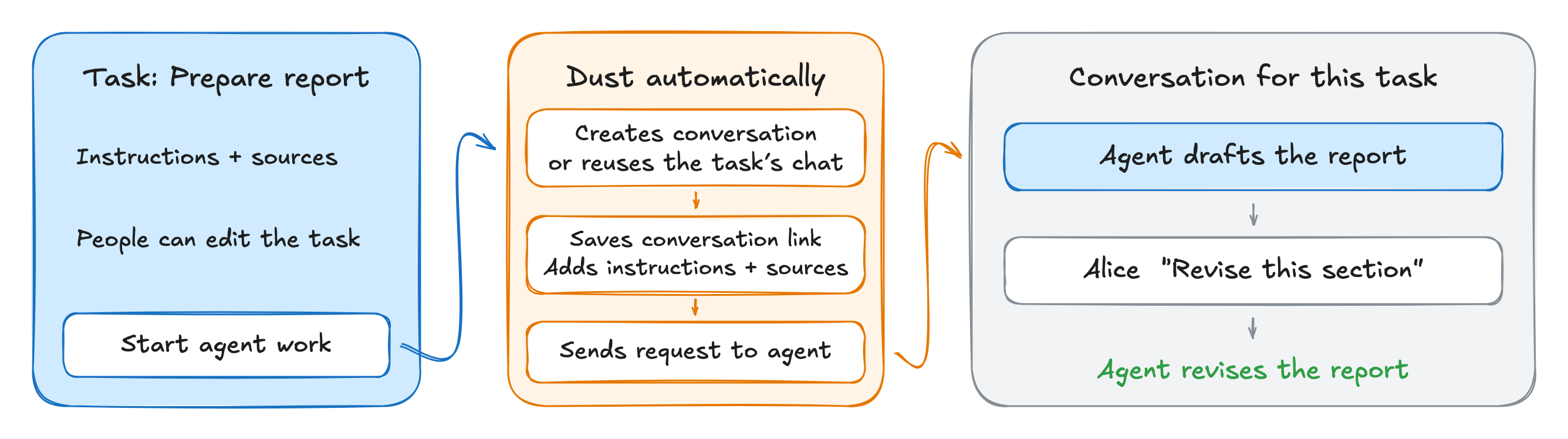
Dust asks the agent to get a person’s confirmation before marking the task done, but does not verify that the agent actually received that confirmation.
Paperclip is a web application for assigning goals to AI agents and tracking their work and costs, even when different tools run the agents. Its Slack integration also lets people start and continue agent work. Paperclip keeps an assignment’s status, comments, and agent activity in an issue, so an employee can review progress when they return. The issue also records the assignee and lets the employee add information or reassign the work.
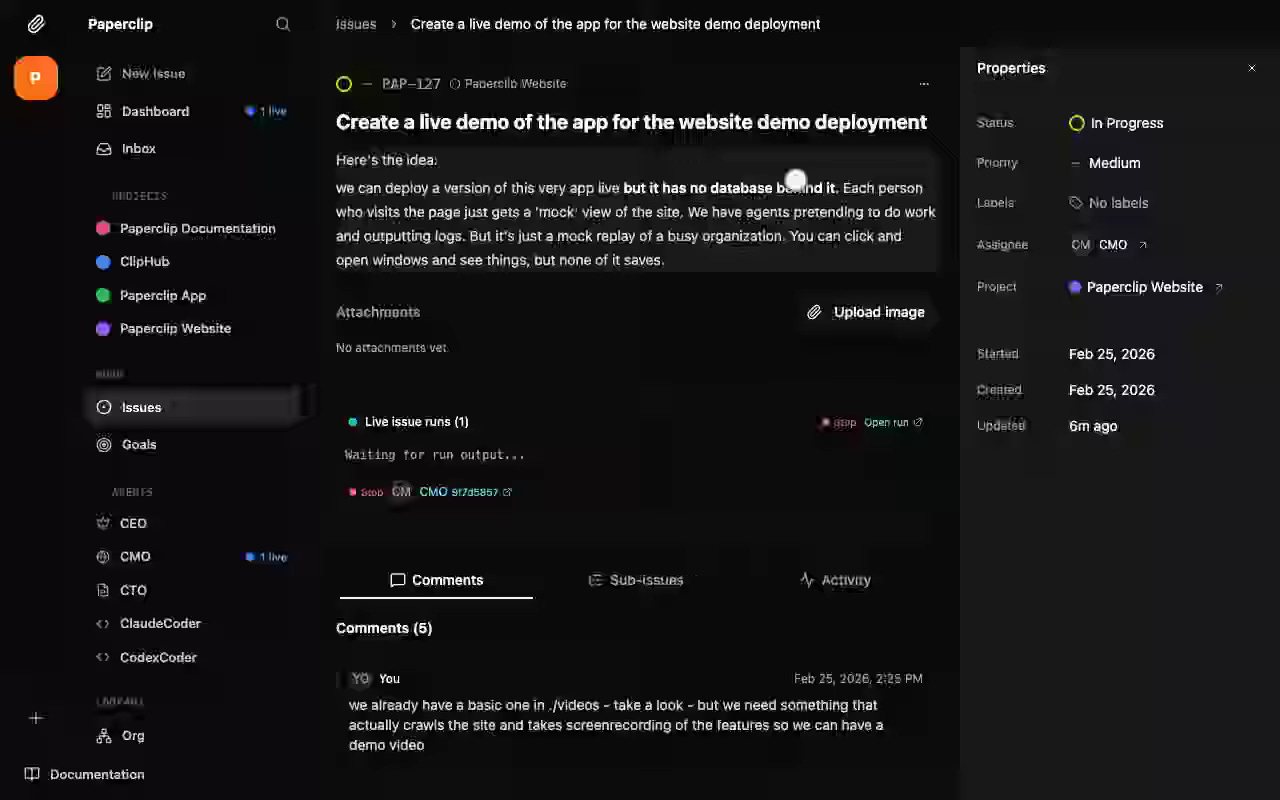
When a person adds a comment or changes an issue’s assignment, Paperclip can request that the assigned agent run again, depending on the issue’s state.
Desplega Agent Swarm lets people submit tasks to AI agents through a web dashboard or Slack. In the dashboard’s task form, a person describes the work and selects an agent. The lead agent is the default choice and can delegate work, but a person can also assign a task directly to another agent. The task page shows the assigned agent, progress, and results. A person adds follow-up instructions to the task without selecting the agent again.
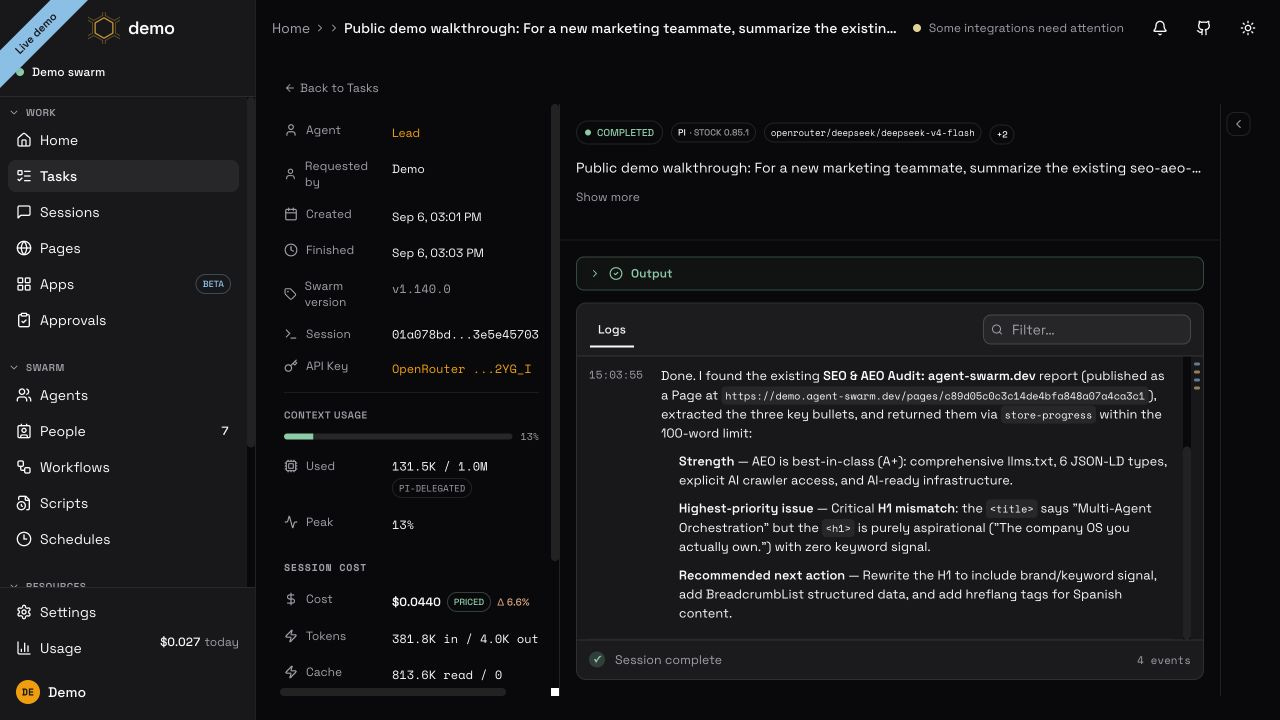
Agent Swarm routes those instructions using the task’s assignment. Each worker uses an agent tool such as Claude Code or pi. The code connecting Agent Swarm to the agent tool determines whether new instructions interrupt current work or wait in a queue. If the running agent cannot receive the instruction, Agent Swarm can create a linked follow-up task that records who requested it. Workers can retain their environment and task context across exchanges.
Open SWE is a coding-agent application with a web dashboard, Slack and GitHub integrations, a CLI, and an experimental desktop client. Developers delegate engineering work through conversations and review the resulting changes. Engineering requests retain their context across runs. A human request and its follow-ups stay in the same conversation thread. For cloud coding tasks, the thread also has a persistent sandbox, a Linux environment where the agent edits repository files and runs commands. Later runs reuse that environment when it remains available. A developer can return to the conversation to refine the request after implementation has begun.
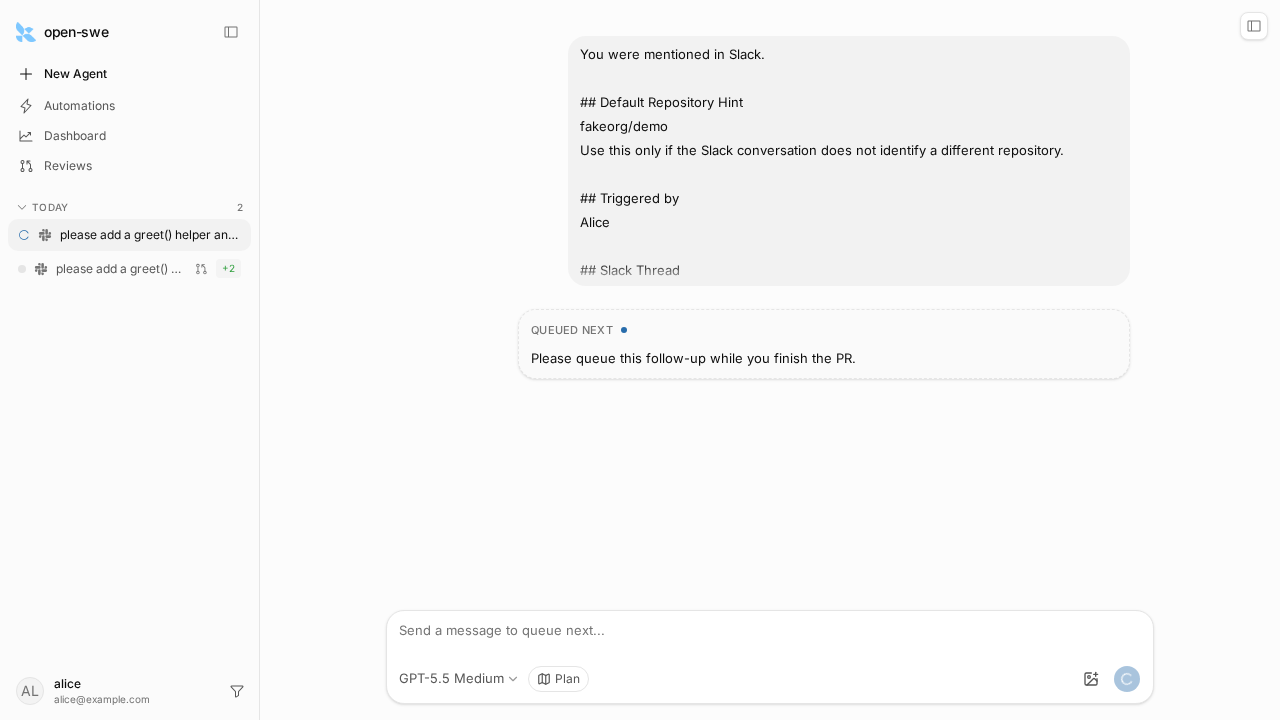

Open SWE also implements an optional Slack human-review flow. With the feature enabled, a review request can produce a Slack card where a person signs up, then reviews the pull request on GitHub.
Shared knowledge and reusable skills
People need ways to inspect and correct the knowledge and skills agents retain for future work.

Imagine a team working with an agent on a monthly sales report. Alice asks the agent to reuse the report’s structure next month. Bob points out that the agent counted canceled orders as revenue and asks it to exclude them. Next month, the agent could forget Alice’s preference and repeat the mistake Bob already fixed. The team needs to see what the agent remembers and revise it, so each report benefits from the work they have already done.
OpenWiki generates a linked Markdown wiki from codebases and other sources. It has a CLI, coding-agent integrations, and a browser viewer. Retained knowledge becomes documentation that people can inspect. The pages link claims to supporting sources. When source content changes, the system can mark affected claims stale and record that the relevant pages need attention.
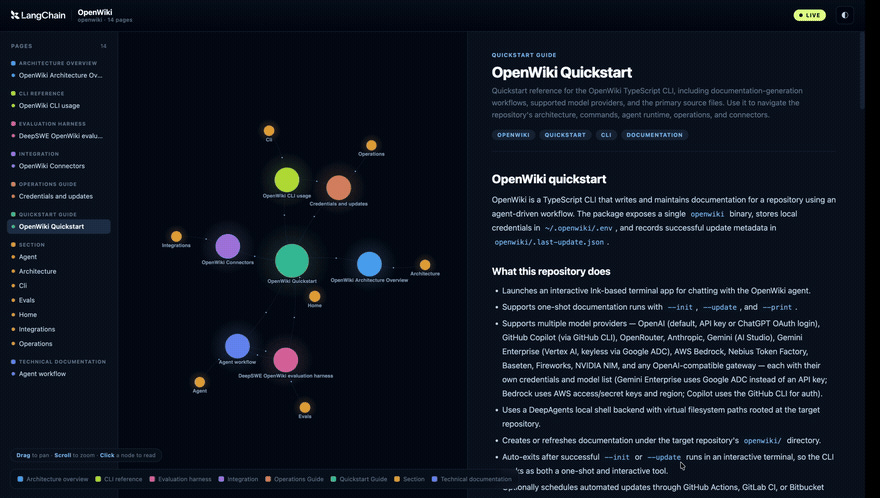

A maintenance pass can confirm, revise, or retract claims, and people can review the diffs against linked sources to judge whether the updates are correct.
Hermes can save a user’s corrections and preferences as reusable skills for future tasks by reviewing the conversation in the background. In the sales-report example, Alice’s preferred structure and Bob’s rule about canceled orders could become instructions in a reporting skill that the agent loads for a later task.
Hermes counts passes through its agent loop across user requests. Each pass asks the model what to do next and runs any tools the model requests. After Hermes finishes answering a request, it can start a background review if the count has reached the configured minimum.
The reviewer is a separate model run that reads the conversation for lessons to save. It can create a skill or update an existing one through skill_manage. Before patching an existing skill, it must read the current SKILL.md, typically through skill_view, so it can choose the passage to change.
Suppose the reporting skill already contains “Sum all order amounts.” After reading Bob’s correction, the LLM reviewing the conversation supplies that existing sentence as old_string and “Exclude canceled orders before summing revenue” as new_string. The patch handler searches the current file contents for old_string and replaces the matching passage with new_string.
hermes-agent/tools/skill_manager_tool.py
if read_guard := _background_review_read_before_write_guard(name, target, "patch", target_label):
    return read_guard
content = target.read_text(encoding="utf-8-sig")

# Use the same fuzzy matching engine as the file patch tool.
from tools.fuzzy_match import fuzzy_find_and_replace
new_content, match_count, _strategy, match_error = fuzzy_find_and_replace(
    content, old_string, new_string, replace_all)
if match_error:
    with suppress(Exception):
        from tools.fuzzy_match import format_no_match_hint
        match_error += format_no_match_hint(match_error, match_count, old_string, content)
    return _err(match_error) | {"file_preview": _clip(content, 500, "...")}
if err := _validate_content_size(new_content, label=target_label):
    return _err(err)
if not file_path and (err := _validate_frontmatter(new_content)):
    return _err(f"Patch would break SKILL.md structure: {err}")
if guard := _guarded_write(name, skill_dir, target, "patch", target_label, new_content):
    return guard
Reading the file does not guarantee that the reviewer supplies a valid match. The matcher tries exact text first, then more tolerant strategies. If it finds no match, the handler returns an error before saving anything. With the default replace_all=False, multiple matches also cause an error, so the reviewer must include enough surrounding text to identify one passage.
Once the replacement passes the size and format checks, _guarded_write saves the revised file. The learned rule is now part of the procedure a future task can load. Ownership checks restrict which skills the background reviewer may change, and people can also require approval before an update is saved.
Hermes’s memory and skill write-approval settings are off by default. When enabled, gateway and background memory changes, along with skill changes, can be staged for later review. Foreground memory changes can instead be approved inline. Commands such as /memory pending and /skills diff let people inspect proposed updates before approving or rejecting them. People can correct retained procedures as well as invoke them.
QM’s skills belong to scopes and can be shared through grants. Publishing a skill for the whole organization requires a human administrator of the organization. The skill store copies the published skill into the target scope, preserving its creator and assigning an organization-scope version. A technique Alice finds useful can remain personal, be shared with a smaller audience, or become an organization-wide practice through an explicit decision.
Proactive participation
An agent may have useful information before anyone asks for it. Deciding whether to contribute requires judging what the conversation needs, who is already responding, and whether an interruption would help.

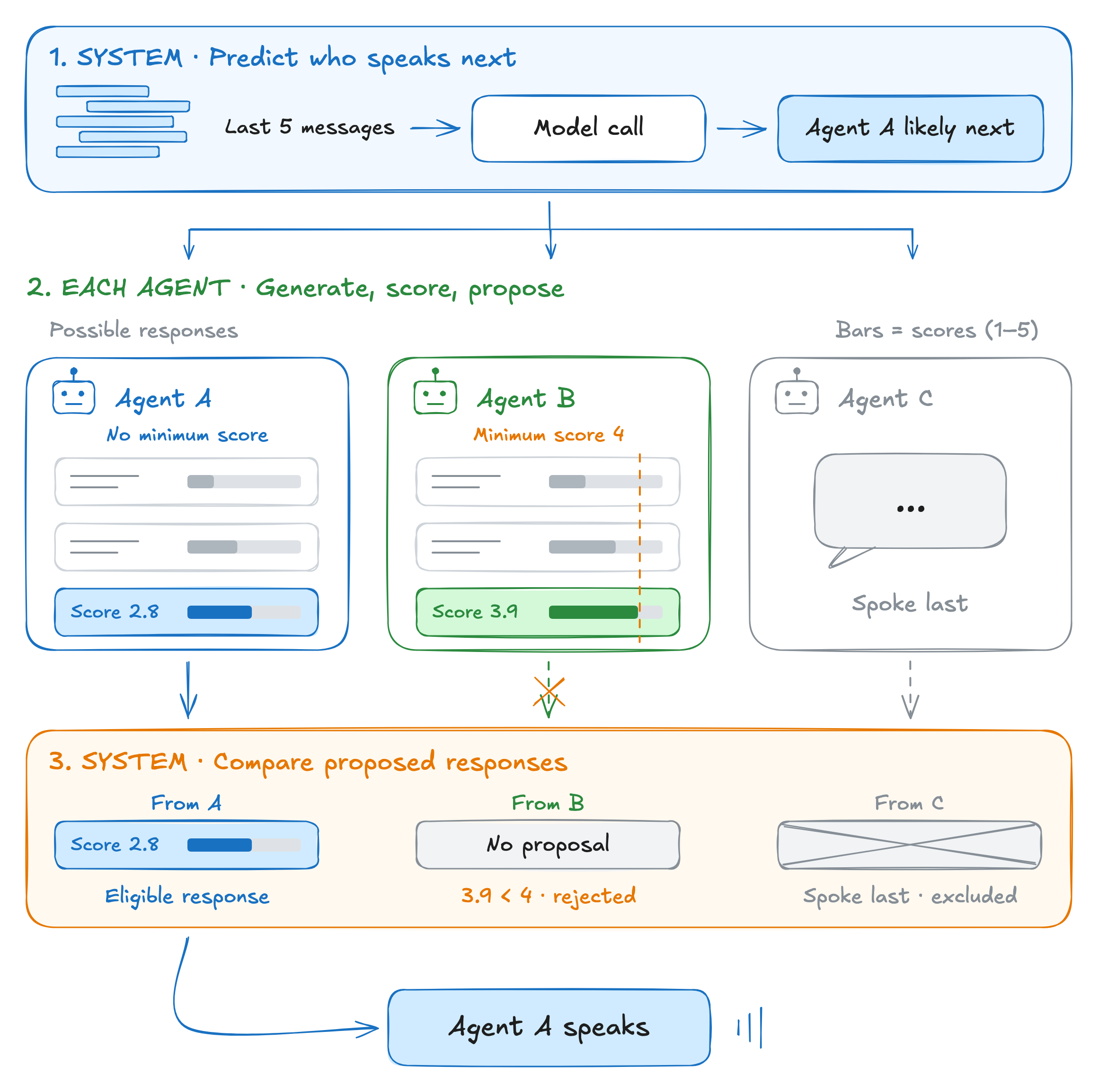
Thoughtful Agents, the framework accompanying the Inner Thoughts paper from CHI 2025 (the ACM Conference on Human Factors in Computing Systems), addresses participation in a conversation. After an event, an agent generates possible contributions and evaluates them using conversation and memory context. Its evaluation prompt considers information gaps, urgency, originality, and whether another participant is likely to contribute. Generating a contribution and deciding whether to say it are separate decisions.
The system sends the last five messages to a language model and asks who is likely to speak next. The model returns a participant’s name, or “anyone” if the messages do not suggest a specific next speaker. The system shares this answer with all agents.
Each agent generates possible things to say next and scores how strongly it wants to say each one on a scale from 1 to 5. It then selects at most one response to propose. The expected speaker proposes its highest-scoring response without a minimum score requirement. By default, other agents need a score of at least 4 to propose a response. If no particular speaker is expected, the usual minimum is 3.5, with a random fallback that can admit a lower-scoring spontaneous response. The model predicts who will speak next but does not choose the minimums.
The system compares only the proposed responses, excluding the agent that spoke last. The agent whose proposed response has the highest score is chosen to speak. If there are no eligible responses, the agents stay silent.
These rules control participation in a research prototype. They do not establish whether the chosen contribution will help a working team.
Company Brain checks new Slack messages before deciding whether to participate. For channel posts outside a thread, code first filters out bot messages, empty or emoji-only messages, and messages that mention another user without mentioning Company Brain. Direct requests to Company Brain follow a separate path. The proactive path also stops if the channel is set to quiet or the sender cannot be verified as a current organization member.
Each message that passes these checks triggers an LLM call to decide whether and how to respond. This call is the triage step. The model receives the message, recent conversation, speaker, and channel context, then chooses to answer, react with an emoji, investigate, or stay silent. Selecting an answer or investigation can start the main agent. Company Brain limits how often the agent can reply without being asked and how many investigations it can run at once or start per hour. The participation criteria for the LLM call are written into TRIAGE_CHANNEL_PROMPT.
company-brain/src/brain/slack/triage.ts
- Who is it for? A message that continues an exchange between
people, or addresses another person or bot, belongs to them —
stay out even when Company Brain knows the topic.

- What would Company Brain add that the people talking do not
already have? A fact, a check, or offered legwork adds something;
an opinion, a vote, or agreement in a human discussion adds nothing.

[...]

Write the Reason as instructions to the full agent: what to verify,
and what a good response looks like if confirmed.

Investigation requires a checkable claim: a named failure, metric,
person, or event the checks could confirm or refute.
Knowing an answer does not justify interrupting a question addressed to someone else. The model must consider the intended audience, what its contribution would add, and whether a proposed investigation has something specific to check.
The reason returned by the triage call becomes instructions for the responding agent. If the model selects investigation, buildPassiveInvocationContext() adds instructions containing that reason to the agent’s context.
company-brain/src/brain/turn/compute.ts
const runtimePrompt = [
    baseRuntimePrompt,
    options?.passiveInvestigation
        ? buildPassiveInvocationContext(options.passiveInvestigation.reason)
        : "",
]
    .filter(Boolean)
    .join("\n\n")
In one example, a colleague reports unusual signups after a deployment. The triage prompt instructs the model to choose investigation and direct the agent to check signup metrics and recent deployments, then report any confirmed changes.
Company Brain runs passive investigations with read-only tool restrictions and can finish without replying. Before posting a finding, the runtime checks whether the agent has reached its limit on unrequested replies or someone has muted the thread. Either condition can prevent the agent from posting. The model still has to judge whether its message would help the conversation.
Collaboration between humans
People need to review agent contributions together, understand their colleagues’ positions, and decide what the team accepts. Shared conversations and review records can make the reasoning, feedback, and remaining disagreements available to everyone involved.

For example, suppose Alice shares an agent’s recommendation with Bob. Bob needs to inspect the reasoning, raise objections, and know whether the team has accepted the proposal. People need to be able to question an agent’s proposal and see whether the team has agreed to it.
Shared review also requires enough context to question a proposal. If Alice shares only an agent’s finished answer, Bob may miss the assumptions and sources behind it. Making selected prompts, sources, and revisions available would let Bob challenge the reasoning without requiring Alice to publish every private exchange.
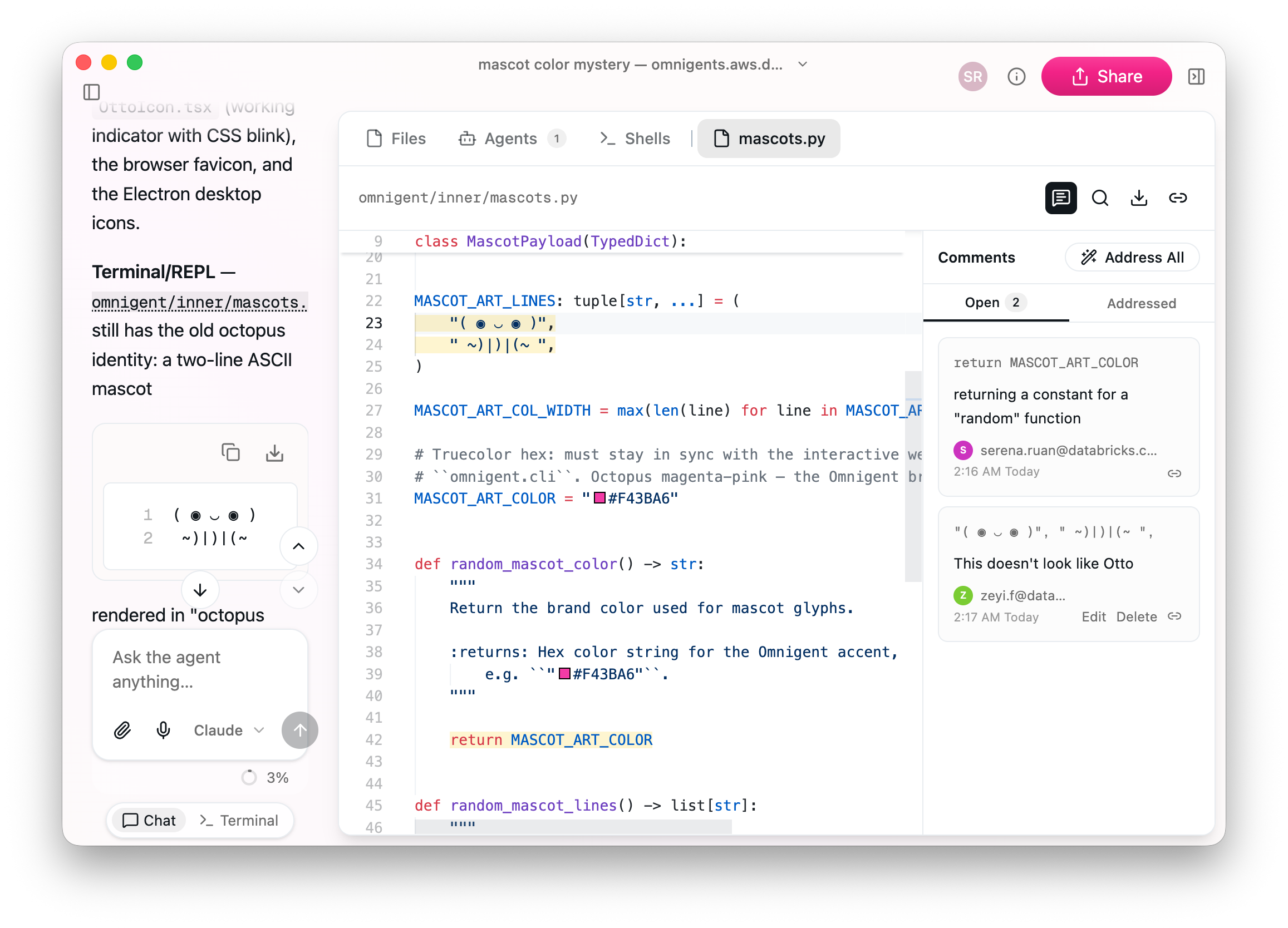
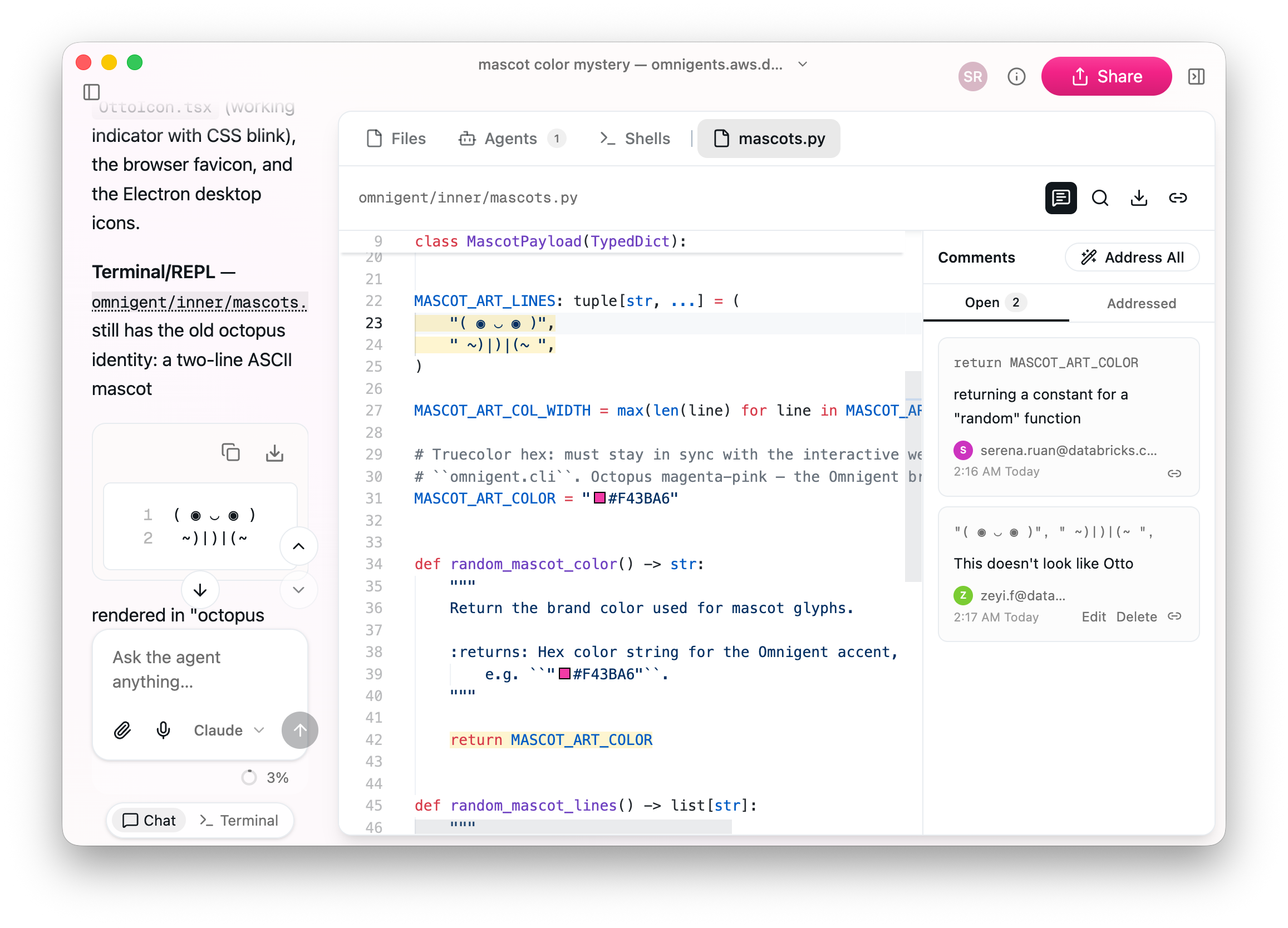
Omnigent is an application from Databricks for working with AI agents through web, desktop, terminal, and mobile interfaces. Colleagues can join an existing agent session. Alice can share the conversation with Bob so he can inspect the discussion that produced the agent’s answer. With Edit access, Bob can contribute instructions and review workspace files. He can also fork the conversation at a selected response to investigate another approach in a separate session. The fork preserves conversation history; its computing environment is configured separately.
Colleagues review the same work while retaining authorship of their feedback. Comments on shared files show who wrote them. Alice cannot rewrite or delete a comment attributed to Bob, even with Edit access. Bob can attach an objection to selected text.
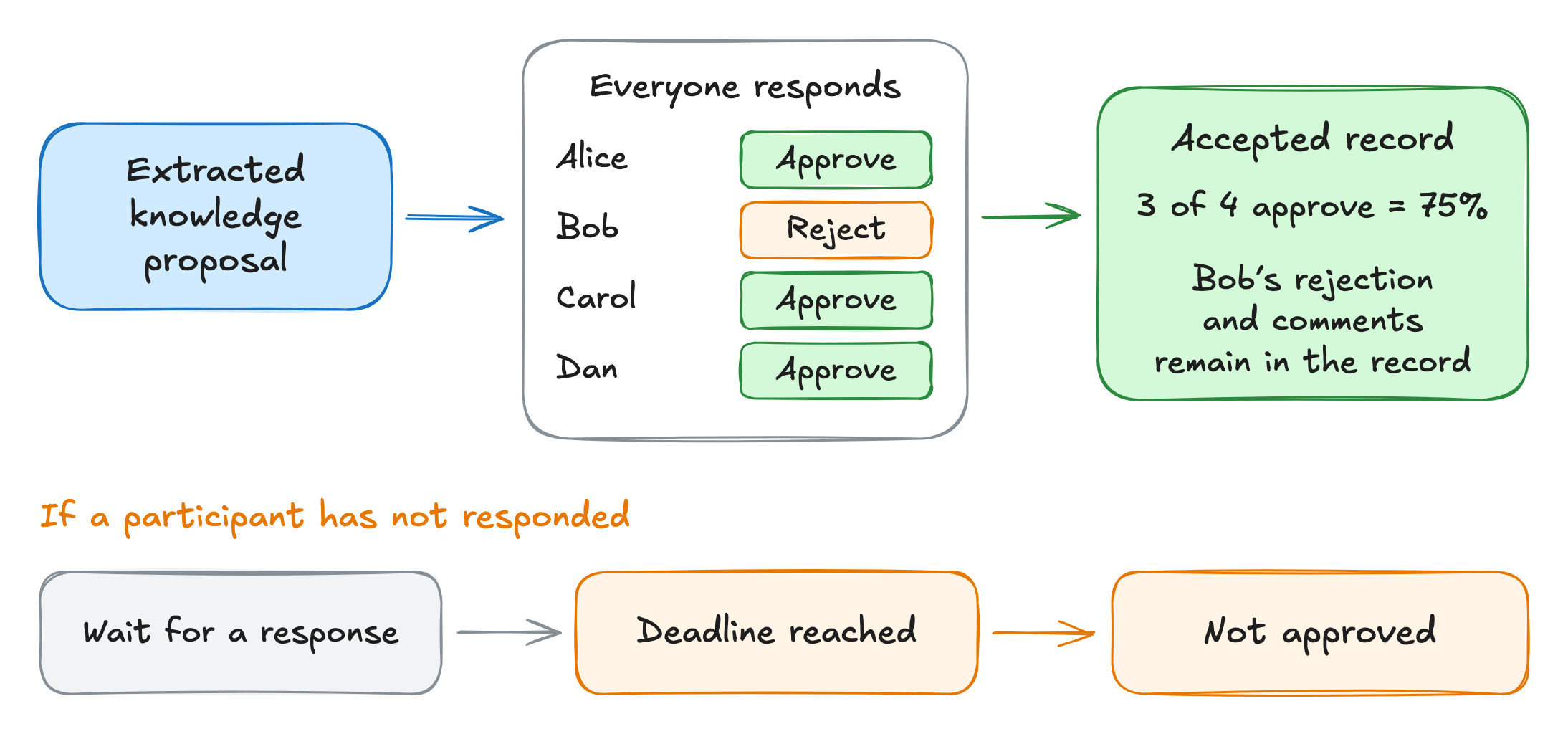
D-PC Messenger is a desktop messaging application for people and AI agents. The project is in alpha. It turns knowledge extracted from group conversations into proposals that participants can approve, reject, request changes to, or explicitly abstain from voting on.
Its default approval threshold is 75% of the participant roster, and normal finalization waits for every participant’s response. The deadline path cannot approve a proposal. Requiring a response from every participant can prevent acceptance when colleagues are unavailable.
Accepted records retain who rejected the proposal and participants’ comments, so later readers can inspect objections to the retained material. Note that a proposal can receive enough votes to be accepted and still contain incorrect information.
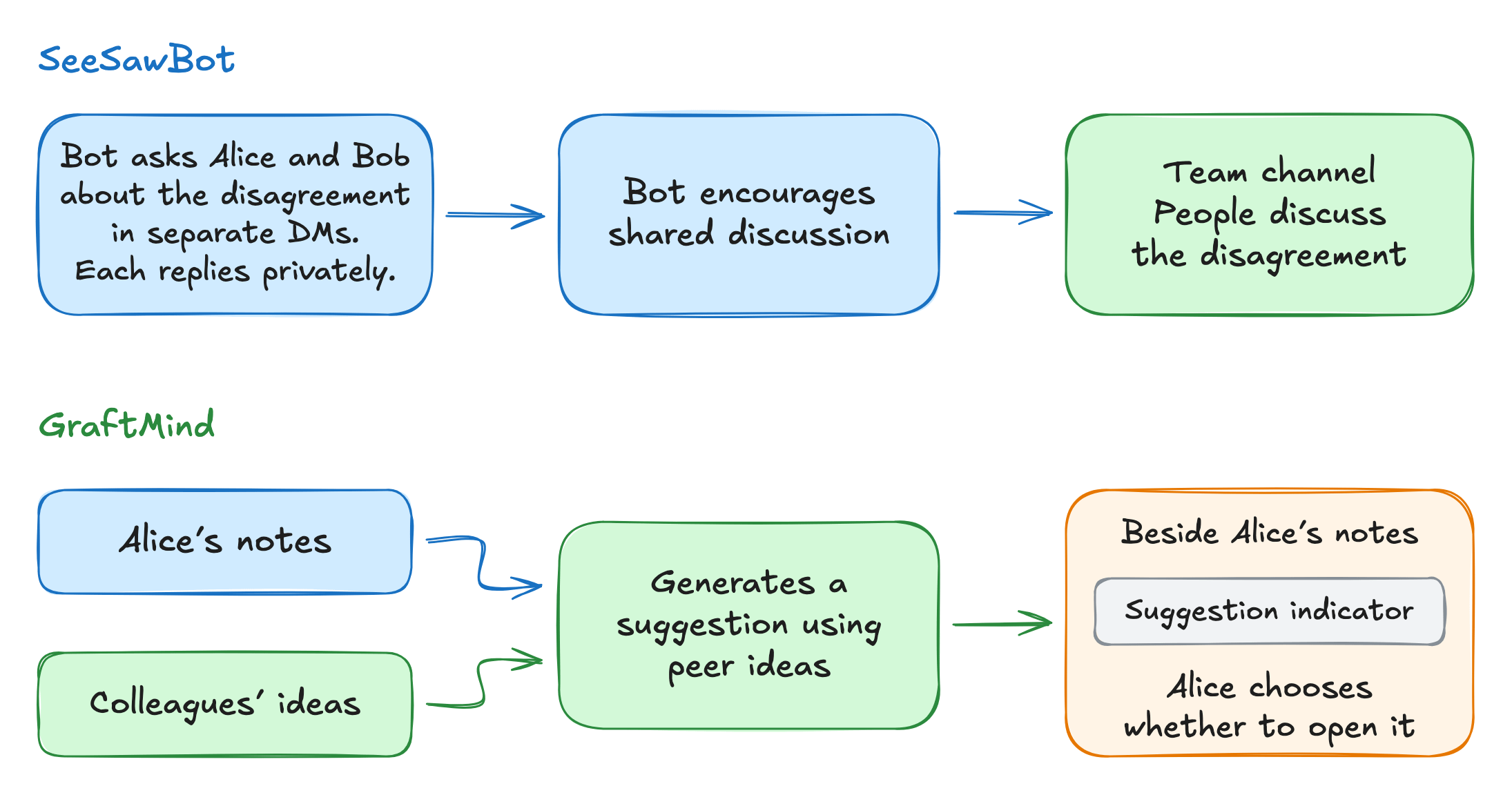
Research prototypes explore agents helping people exchange perspectives. SeeSawBot, a CHI 2026 (the ACM Conference on Human Factors in Computing Systems) Slack prototype, chooses whom to contact and whether to use a private message or the team channel. In one reported disagreement, the bot privately asked members for their perspectives, then encouraged them to discuss the issue together in the channel. Participants also described prompts that encouraged quieter members to contribute. The agent helps arrange the discussion; people still need to judge the disagreement and reach a decision.
GraftMind, another CHI 2026 prototype, lets people brainstorm on separate digital whiteboards. During brainstorming, people cannot directly view their colleagues’ notes, but GraftMind can access them. For example, the system compares Alice’s notes with her colleagues’ notes and selects an idea that relates to hers or introduces a different direction. GPT-4.1 uses the selected idea to generate a suggestion that helps Alice develop her idea or explore another approach. The model is instructed to generalize the source idea and avoid naming its author. A suggestion indicator appears beside Alice’s notes, and she chooses whether to open it.
Design choices in human–AI collaboration
Several design choices define how a collaboration product works.
Existing workflows. Can the team work in its current tools, or must conversations, files, and tasks move to a new application?
Personal context and permissions. Which private information and connected accounts can an agent use in shared work, and who controls that access?
Agent autonomy. Which actions can an agent take independently, and which require approval enforced by the application?
Roles and expectations. How do people explain their responsibilities to an agent and correct its understanding?
Shared editing. Check how the product handles concurrent changes and shows who contributed them.
Human guidance. Corrections need to reach the agent in time, with clear authority for approvals and conflicting instructions.
Recovery. People need to know which actions they can stop or undo and how to take over the work.
Ongoing assignments. Keep progress and follow-up instructions available, and make clear who reviews and accepts the result.
Reusable knowledge. People need ways to inspect sources, correct saved guidance, and control who can use it.
Agent participation. Consider when an agent should speak, whom it should address, and whether its contribution helps the discussion.
Team decisions. Colleagues need sources and assumptions to review proposals, plus a record of accepted decisions and remaining objections.